How Barcode Printers Detect Labels – Gap Sensor vs Black Mark Sensor (Complete Beginner's Guide)
How Barcode Printers Detect Labels – Gap Sensor vs Black Mark Sensor


One of the most common questions users ask after installing a barcode printer is:
Why is my printer skipping labels, printing in the wrong position, or feeding multiple labels?
In most cases, the problem isn't the printer itself—it is label detection.
Every barcode printer must know exactly where one label ends and the next one begins. To accomplish this, printers use built-in sensors that detect registration marks on the media.
The two primary methods are:
- Gap Sensor
- Black Mark Sensor
Understanding how these sensors work will help you select the correct labels, configure your printer correctly, and solve many printing issues in minutes.
Why Does a Barcode Printer Need a Label Sensor?
Unlike ordinary office printers that print on continuous sheets of paper, barcode printers usually print on individual labels attached to a backing liner.
The printer needs to know:
- Where each label starts
- Where each label ends
- When to stop feeding
- Where to begin printing the next label
Without proper detection, labels may:
- Print too high
- Print too low
- Skip labels
- Print across two labels
- Feed continuously
- Stop with blank labels
The sensor prevents all of these problems.
Method 1 – Gap Sensor
What Is a Gap Sensor?
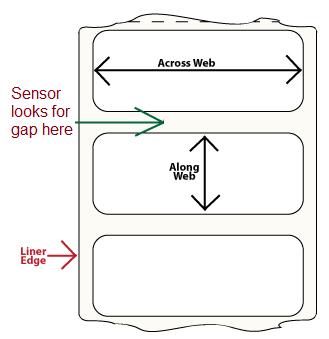
A Gap Sensor detects the small empty space between two labels.
The printer shines light through the label material.
When the sensor reaches the gap:
- More light passes through
- The printer recognizes the space
- It knows the next label is beginning
This is the most common label detection method used worldwide.
How It Works


Imagine a roll like this:
Label
█████████████
Gap
-------------
Label
█████████████
Gap
-------------
During printing:
- Sensor reads label
- Light is blocked
- Gap arrives
- Light passes through
- Printer detects the transition
- Printing begins on the next label
Best Applications
Gap sensing is commonly used for:
- Shipping labels
- Product barcode labels
- Retail labels
- Warehouse labels
- Inventory labels
- Logistics labels
- Asset labels
- Pharmaceutical labels
Most thermal labels sold today use gap sensing.
Advantages
✔ Simple design
✔ Fast calibration
✔ Low manufacturing cost
✔ Highly reliable
✔ Supported by nearly every barcode printer
Limitations
Gap sensors may struggle with:
- Transparent labels
- Clear PET labels
- Very thick materials
- Labels without a noticeable gap
- Some metallic materials
For these applications, black mark sensing is often preferred.
Method 2 – Black Mark Sensor
What Is a Black Mark Sensor?
Instead of detecting the gap, the printer detects a printed black registration mark on the liner or back of the media.
The printer looks for the dark mark rather than an empty space.
How It Works


The back of the liner looks like:
□□□□□□□□□□□□
██████████ ← Black Mark
□□□□□□□□□□□□
██████████
□□□□□□□□□□□□
The printer sensor continuously scans the liner.
When it detects the black mark:
- Printing position is reset
- Next label begins
- Alignment stays accurate
Common Applications
Black mark labels are commonly used for:
- Jewellery labels
- Medical labels
- Laboratory labels
- Wristbands
- Tickets
- Tags
- Continuous media
- Transparent labels
- Synthetic labels
- Pre-printed labels
Why Transparent Labels Need Black Mark Detection
Transparent labels present a challenge because both the label and liner allow light to pass through.
A gap sensor may not detect enough difference between the label and the gap.
Adding a black registration mark gives the printer a strong, reliable reference point regardless of label transparency.
Gap Sensor vs Black Mark Sensor
|
Feature |
Gap Sensor |
Black Mark Sensor |
|
Detects |
Gap between labels |
Printed black mark |
|
Sensor Type |
Transmissive |
Reflective |
|
Most Common |
Yes |
Less common |
|
Transparent Labels |
Usually difficult |
Excellent |
|
Paper Labels |
Excellent |
Excellent |
|
Synthetic Labels |
Good |
Excellent |
|
Continuous Media |
No |
Yes |
|
Cost |
Lower |
Slightly higher media cost |
|
Calibration |
Easy |
Easy |
Transmissive vs Reflective Sensors
Most barcode printers contain one or both sensor types.
Transmissive Sensor
Works by:
- LED below media
- Receiver above media
- Detects light passing through
Used for:
- Gap sensing
Reflective Sensor
Works by:
- LED shines onto media
- Sensor measures reflected light
- Black mark absorbs light
- White liner reflects light
Used for:
- Black mark sensing
Which Barcode Printers Support Both?
Many professional barcode printers support both detection methods, including models from:
- Zebra
- Honeywell
- TSC
- GoDEX
- BIXOLON
- SATO
- Toshiba TEC
- Citizen
- Argox
- CAB
Some entry-level printers may only support gap sensing, so it's always worth checking the printer specifications before purchasing specialty labels.
How Does the Printer Learn the Label Size?
Modern barcode printers perform media calibration.
During calibration:
- Labels feed forward.
- The sensor scans several labels.
- It measures the gap or black mark.
- The printer stores the detected label length.
- Printing begins with accurate positioning.
Whenever you change:
- Label size
- Label material
- Label colour
- Gap size
- Black mark design
you should recalibrate the printer.
Common Problems Caused by Incorrect Sensor Settings
If the printer is configured for the wrong sensor type, you may notice:
- Printing across two labels
- Continuous feeding
- Blank labels
- Missing labels
- Crooked print position
- "Media Out" errors
- "Paper Out" errors
- Calibration failures
In many cases, simply switching the media type from Gap to Black Mark (or vice versa) resolves the issue.
Troubleshooting Tips
If your printer cannot detect labels:
- Verify that the correct media type is selected.
- Clean the sensor with a lint-free swab and isopropyl alcohol.
- Perform media calibration.
- Ensure the labels are loaded correctly.
- Confirm the gap or black mark is consistent throughout the roll.
- Check that the sensor is aligned with the gap or mark (if adjustable).
- Inspect the liner for damage or contamination.
Choosing the Right Label Type
Choose Gap Labels when you need:
- Standard barcode labels
- Shipping labels
- Retail labels
- Warehouse labels
- Inventory labels
Choose Black Mark Labels when you need:
- Transparent labels
- Continuous media
- Wristbands
- Tickets
- Synthetic labels
- Pre-printed media requiring precise registration
Selecting the correct label type helps ensure accurate feeding and minimizes downtime.
Final Thoughts
Understanding how barcode printers detect labels is essential for reliable printing. Gap sensors and black mark sensors both serve the same purpose—identifying the start of each label—but they do so in different ways.
For most everyday applications, gap sensing is the standard and simplest solution. For transparent, synthetic, or specialized media, black mark sensing provides a more dependable reference.
Whenever you switch label types or experience alignment issues, recalibrating the printer and verifying the correct sensor setting are among the quickest ways to restore accurate printing.
Frequently Asked Questions (FAQ)
Can a barcode printer use both gap and black mark labels?
Many desktop and industrial barcode printers support both sensor types. The correct media setting must be selected before printing.
Why is my printer feeding several blank labels?
This often happens when the printer is set to the wrong sensor type or when media calibration has not been performed.
Are gap labels cheaper than black mark labels?
Generally, yes. Gap labels are more common and usually less expensive to manufacture because they do not require printed registration marks.
Can transparent labels use a gap sensor?
Some printers can detect certain transparent labels, but black mark sensing is usually more reliable for clear media.
Do I need to calibrate my printer every time I change labels?
Yes. Recalibrating after changing label size, material, or detection method helps the printer learn the new media characteristics and maintain accurate print positioning.