What Is a Barcode?
What Is a Barcode? A Complete Beginner's Guide to Barcode Technology
A barcode is a machine-readable representation of data that allows products, documents, assets, and packages to be identified quickly and accurately.
If you're looking for a barcode explained in simple terms, this barcode tutorial will teach you everything you need to know. You'll learn how barcode technology works, explore common barcode examples, understand different barcode symbols, discover where barcodes are used, and learn why they sometimes fail to scan.
Instead of typing product numbers manually, a barcode scanner reads printed patterns and instantly converts them into digital information. This makes every modern barcode system faster, more accurate, and more reliable.
Today, barcodes are used almost everywhere:
Barcode Applications and Uses
One of the biggest advantages of barcode technology is its flexibility. Today, barcode applications can be found in almost every industry.
Common barcode uses include:
- Retail product identification
- Inventory management
- Warehouse operations
- Shipping and logistics
- Hospital patient identification
- Laboratory sample tracking
- Manufacturing
- Government document tracking
- Asset management
- Library systems
- Airline baggage handling
Whether you're printing barcode labels for products or tracking valuable equipment, a barcode system dramatically reduces manual errors and improves efficiency.
Without barcodes, modern inventory management and logistics would be far slower and much more prone to human error.
How Does a Barcode Work?
A barcode does not store a picture.
Instead, it stores information using carefully designed patterns.
For a traditional (linear) barcode:
- Black bars absorb the scanner's light.
- White spaces reflect the light.
- The scanner detects these reflections.
- The decoder converts the pattern into numbers or letters.
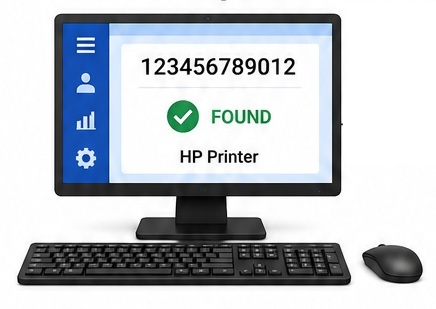
- The computer looks up the data in a database.
Did you know?
Most retail barcodes do not store the product name or price. They usually contain only a product identification number. The computer retrieves the full product information from a database after scanning.
For example:
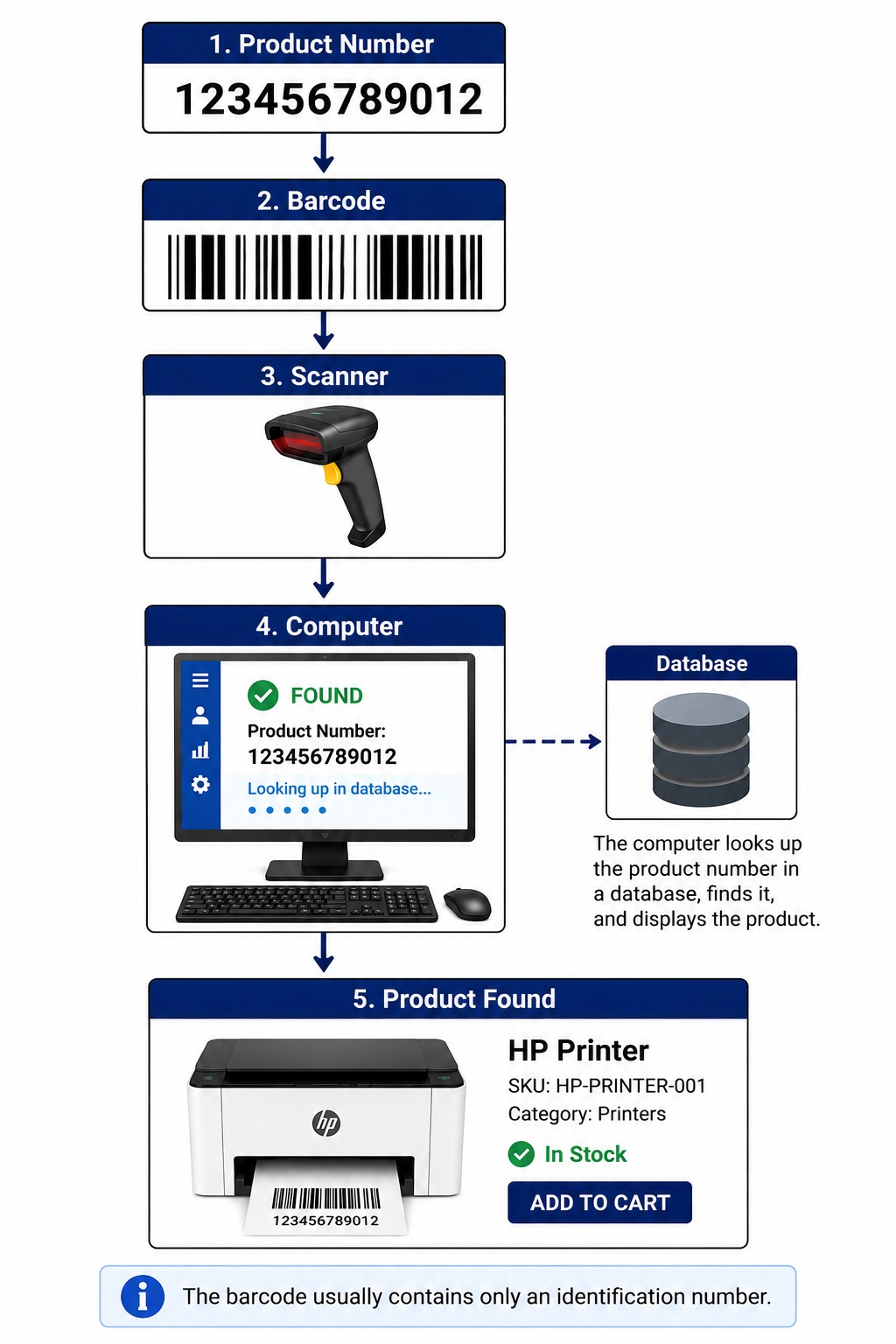
The barcode usually contains only an identification number.
The product description, price, and stock quantity are stored inside the computer system-not inside the barcode itself.
Why Were Barcodes Invented?
Before barcodes, every product had to be entered manually.
This caused:
- Slow checkout
- Typing mistakes
- Inventory errors
- Difficult stock tracking
Barcodes solved these problems by allowing instant identification with very high accuracy.
Today, millions of barcode scans happen every minute around the world.
History of the Barcode
- 1949 – Bernard Silver and Norman Woodland develop the idea.
- 1952 – Patent granted.
- 1974 – First commercial barcode scanned (Wrigley's chewing gum).
- Today – Billions of scans every day.
Parts of a Barcode
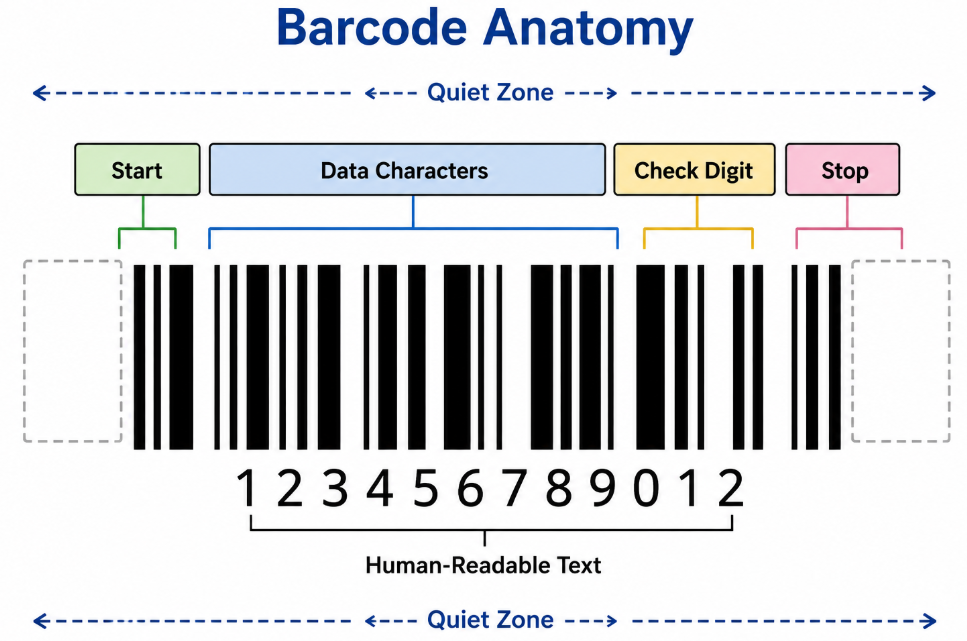
A typical barcode contains several important components:
- Quiet zone
- Start character
- Data characters
- Check digit (for many barcode types)
- Stop character
- Human-readable text
Each section helps the scanner correctly decode the information.
Types of Barcodes
Barcodes are divided into two main categories:
1. Linear (1D) Barcodes
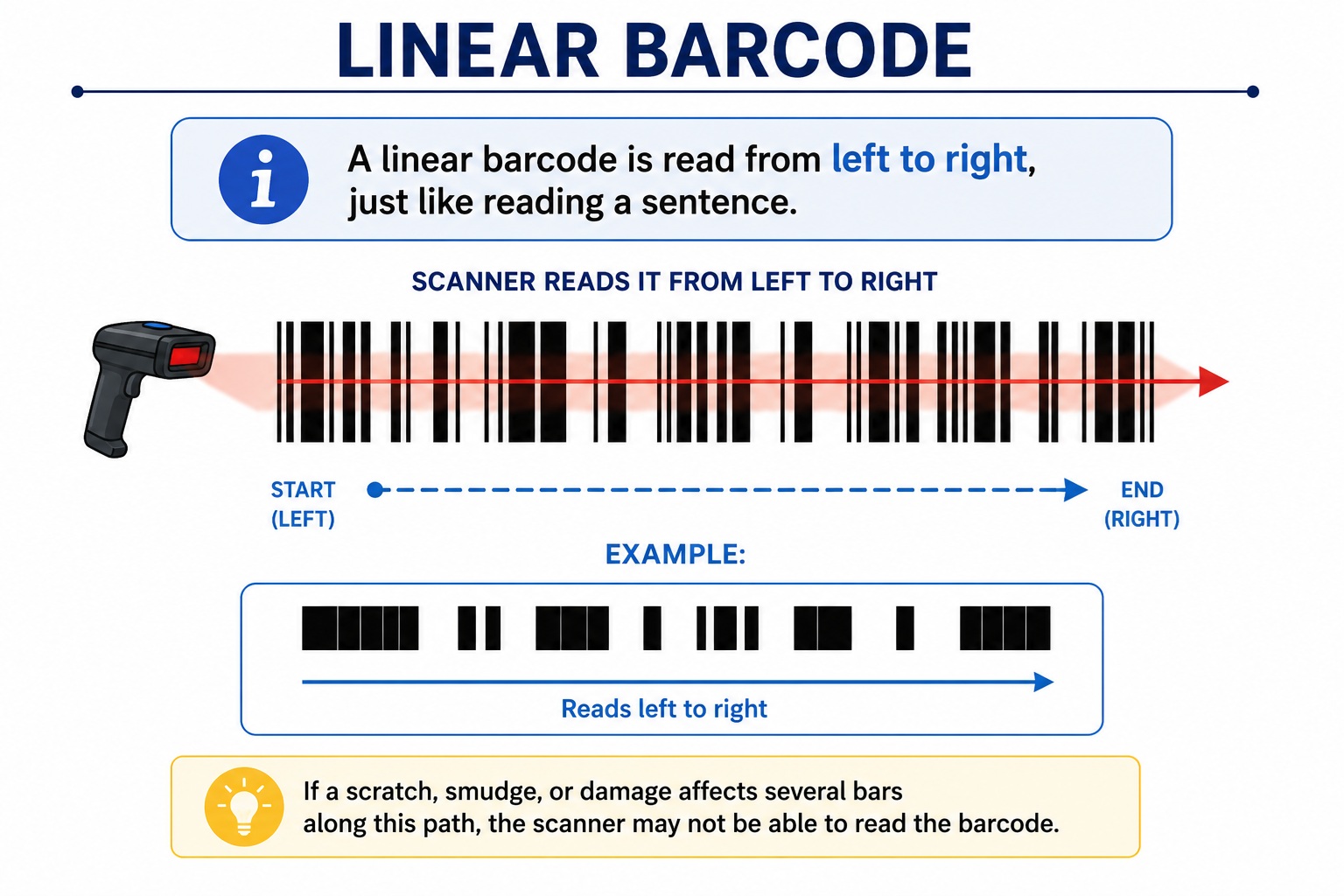
Linear barcodes use parallel black bars and white spaces to store data in a single direction (horizontally). They usually contain a product ID or serial number and require less data storage.
Common examples:
- UPC
- EAN-13
- Code 128
- Code 39
- ITF (Interleaved 2 of 5)
- GS1-128
Best for:
- Retail products
- Shipping labels
- Inventory management
- Warehouses
Common Barcode Types
| Symbology | Type | Common Use |
|---|---|---|
| UPC-A | 1D | Retail |
| EAN-13 | 1D | International retail |
| Code 39 | 1D | Manufacturing |
| Code 128 | 1D | Logistics |
| ITF | 1D | Cartons |
| GS1-128 | 1D | Shipping |
| QR Code | 2D | Websites & payments |
| Data Matrix | 2D | Medical |
| PDF417 | 2D | ID cards |
| Aztec | 2D | Tickets |
2. Two-Dimensional (2D) Barcodes
2D barcodes store data both horizontally and vertically, allowing them to hold much more information in a smaller space. They can also remain readable even if partially damaged.
Common examples:
- QR Code
- Data Matrix
- PDF417
- Aztec Code
Best for:
- Mobile payments
- Product traceability
- Healthcare
- Manufacturing
- Boarding passes
- Websites and digital information
Linear vs 2D Barcodes
Barcodes are divided into two major categories.
1. Linear (1D) Barcodes
Linear barcodes store information in one direction using bars and spaces.
Examples include:
- Code 128
- Code 39
- EAN-13
- UPC-A
- Interleaved 2 of 5 (ITF)
- GS1-128
Advantages
- Very fast scanning
- Easy to print
- Low printing cost
- Compatible with almost every barcode scanner
Disadvantages
- Stores limited data
- Requires more physical space for long numbers
- Usually damaged more easily by scratches across the bars
Typical applications include:
- Retail products
- Shipping labels
- Warehouse labels
- Shelf labels
2. Two-Dimensional (2D) Barcodes
2D barcodes store information both horizontally and vertically.
Instead of simple bars, they use small squares or dots.
Examples include:
- QR Code
- Data Matrix
- PDF417
- Aztec Code
Advantages
- Stores much more information
- Smaller physical size
- Better damage tolerance
- Can often be read even when partially damaged
Common applications
- Medical devices
- Electronics
- Airline boarding passes
- Manufacturing
- Websites
- Mobile payments
QR Codes
The QR (Quick Response) Code is the world's most popular 2D barcode.
It was invented in Japan by Denso Wave in 1994.
Unlike traditional barcodes, a QR Code can store:
- Website addresses
- Contact information
- Wi-Fi credentials
- Email addresses
- Product information
- GPS locations
- Plain text
- Payment information
Modern smartphones can scan QR Codes directly using the built-in camera.
This is one reason QR Codes became extremely popular during the COVID-19 pandemic for menus, payments, and digital check-ins.
|
Feature |
Linear (1D) |
2D Barcode |
|
Data Capacity |
Low |
High |
|
Data Direction |
Horizontal only |
Horizontal & Vertical |
|
Size |
Larger for more data |
Compact |
|
Damage Resistance |
Low |
High |
|
Smartphone Readable |
Usually No |
Yes (QR Codes and many others) |
In simple terms:
- 1D barcodes are ideal for identifying products quickly.
- 2D barcodes are designed to store much more information while using less space.
What Is a Quiet Zone?
The Quiet Zone is the blank white space before and after a barcode.
Although it looks empty, it is one of the most important parts of the barcode.
It tells the scanner:
"The barcode starts here."
Without a proper quiet zone:
- The scanner cannot determine where the barcode begins.
- Adjacent text or graphics may be interpreted as barcode data.
- Scanning may fail completely.
Never place logos, borders, text, or graphics inside the quiet zone.
Barcode Contrast
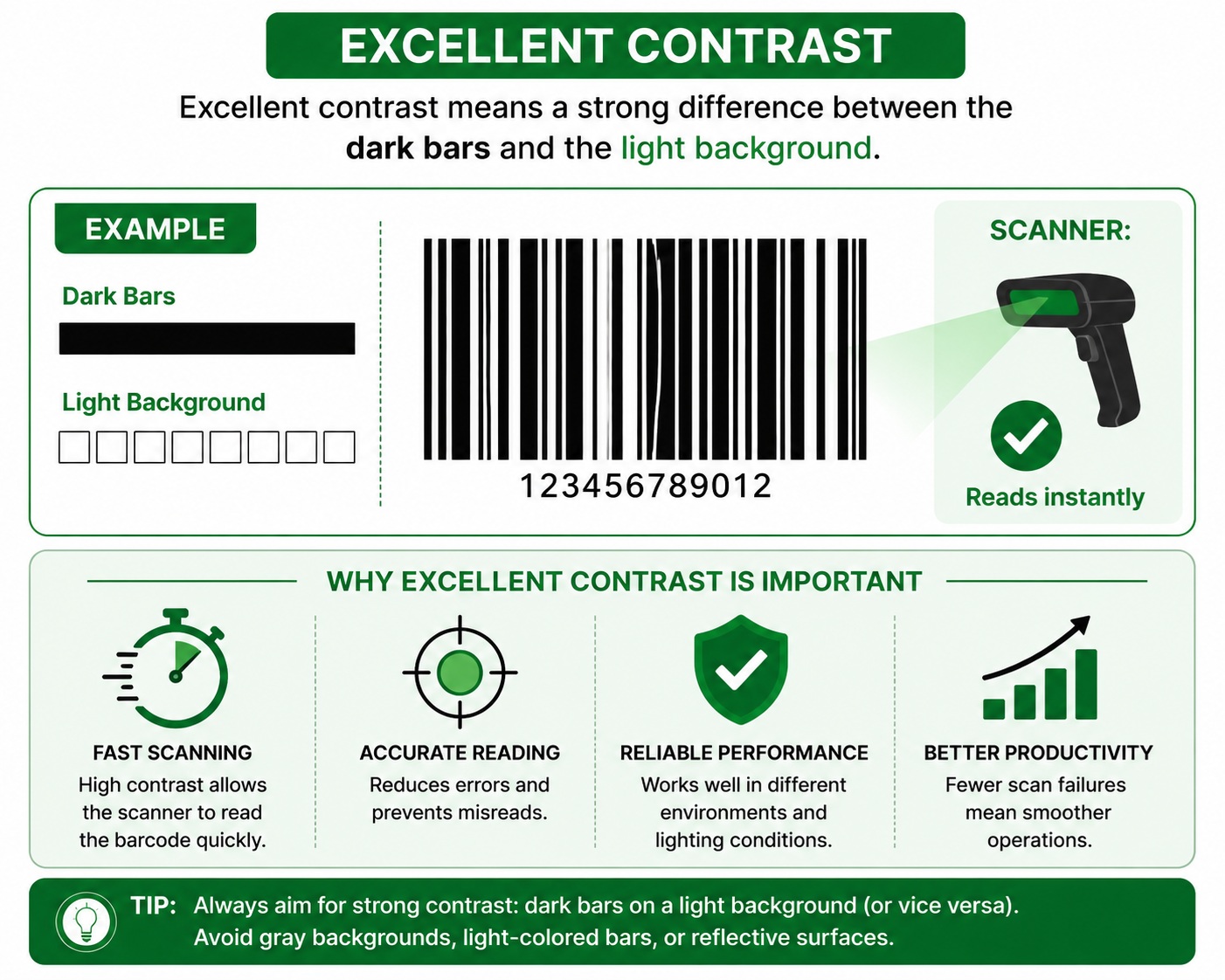
A scanner does not actually "see" colors.
It measures the difference between light reflected by the background and light absorbed by the barcode.
This difference is called barcode contrast.
The best combination is:
- Black bars
- White background
Poor contrast examples include:
- Gray on white
- Yellow on white
- Red on white (for many laser scanners)
- Light blue on white
Poor contrast makes decoding much more difficult.
For the highest reliability, use dark bars on a light background.
Barcode Verification
Many people confuse barcode verification with simply scanning a barcode.
They are very different.
Barcode Validation
Validation checks whether the barcode data is correctly formatted.
For example:
- Correct length
- Correct check digit
- Proper encoding rules
It does not evaluate print quality.
Barcode Verification
Verification measures how well the barcode has been printed.
Special verification equipment checks:
- Contrast
- Edge quality
- Symbol dimensions
- Quiet zones
- Defects
- Decodability
- Overall print quality
Verification is commonly required in industries such as:
- Medical devices
- Pharmaceuticals
- Automotive
- Aerospace
- Government compliance
- GS1 barcode certification
Verification ensures a barcode will scan reliably across different scanners and environments.
Why Barcodes Don't Scan
A barcode may fail to scan for many reasons.
Poor Print Quality
Faded or incomplete printing is one of the most common causes.
Common causes include:
- Worn thermal printhead
- Incorrect ribbon
- Low print darkness
- Dirty printhead
Missing Quiet Zone
Text or graphics placed too close to the barcode can prevent the scanner from detecting the start and end of the symbol.
Low Contrast
Dark bars and light backgrounds provide the highest scanning reliability.
Low contrast reduces readability.
Wrong Barcode Size
If the barcode is printed too small:
- Bars become too narrow.
- Spaces become too narrow.
- The scanner cannot distinguish them accurately.
Damaged Barcode
Common damage includes:
- Scratches
- Wrinkles
- Dirt
- Torn labels
- Smudges
- Water damage
Linear barcodes are particularly sensitive to horizontal scratches that cut across several bars.
Incorrect Scanner
Not every scanner reads every barcode type.
For example:
- A laser scanner usually cannot read QR Codes.
- A 1D scanner cannot decode Data Matrix.
- A low-resolution scanner may struggle with very small barcodes.
Always choose a scanner that supports the barcode symbologies you intend to use.
Barcode Scanner Types
Choosing the correct scanner is just as important as choosing the correct barcode. This barcode scanner guide explains the most common scanner technologies and the types of barcode symbols they can read.
Barcodes have become one of the world's most important identification technologies. From supermarkets and hospitals to warehouses and factories, barcode technology allows businesses to identify products quickly, accurately, and efficiently.
This barcode tutorial has explained how a product barcode works, the differences between linear and 2D barcodes, common barcode symbols, barcode applications, barcode verification, barcode scanners, and the most common reasons why barcodes fail to scan.
Whether you're printing barcode labels, selecting a scanner, or building a complete barcode system, understanding these fundamentals will help you achieve reliable barcode identification and improve operational efficiency.
Laser Scanner
Uses a laser beam to scan linear barcodes.
Advantages
- Fast
- Long scanning distance
- Excellent for retail
Limitations
- Reads only 1D barcodes
- Cannot read QR Codes or Data Matrix
CCD (Linear Imager)
Uses an array of light sensors instead of a laser.
Advantages
- Durable
- No moving parts
- Affordable
Limitations
- Short reading distance
- Primarily for 1D barcodes
Area Imager (2D Scanner)
Captures an image using a camera sensor.
The software analyzes the image to decode the barcode.
Advantages
- Reads 1D and 2D barcodes
- Reads QR Codes
- Reads damaged symbols better
- Reads from mobile phone screens
- Better performance in most modern applications
This is the most popular scanner type today.
Industrial Fixed-Mount Scanner
Installed on production lines and conveyor systems.
Commonly used for:
- Manufacturing
- Packaging
- Logistics
- Automated inspection
These scanners can read thousands of barcodes per hour without human intervention.
Best Practices for Reliable Barcode Scanning
To maximize scanning performance:
- Use high-quality labels.
- Print with sufficient darkness.
- Keep the printhead clean.
- Use the correct ribbon for thermal transfer printing.
- Leave proper quiet zones.
- Maintain high barcode contrast.
- Print at an appropriate size.
- Verify important barcodes before deployment.
- Use a scanner that supports your barcode type.
- Replace damaged labels promptly.
Frequently Asked Questions (FAQ)
Can a barcode contain product information?
Usually no. Most barcodes contain only an identification number that references product details stored in a database.
Is a QR Code a barcode?
Yes. A QR Code is a type of 2D barcode.
Why do supermarkets mostly use linear barcodes?
Linear barcodes are inexpensive to print, quick to scan, and contain enough data for retail product identification.
Can smartphones scan all barcodes?
Most smartphones can scan QR Codes using the built-in camera. Reading traditional 1D barcodes often requires a barcode scanning app.
What is the best barcode color?
Black on a white background offers the highest contrast and the most reliable scanning performance.
What is GS1?
GS1 is the organization responsible for global retail barcode standards adds credibility and can attract searches related to GTIN, UPC, and EAN.
Most retail product barcodes follow GS1 standards, which ensure products can be identified consistently worldwide. GS1 assigns globally unique identification numbers used in UPC, EAN, GS1-128, GS1 QR Code, and other barcode standards.
Did you know?
Most retail barcodes do not store the product name or price. They usually contain only a product identification number. The computer retrieves the full product information from a database after scanning.
Conclusion
Barcodes are one of the most important technologies in modern business. They enable fast, accurate identification of products, assets, and documents while reducing manual work and costly errors.
Whether you're managing a retail store, warehouse, healthcare facility, or manufacturing line, understanding barcode fundamentals-such as linear vs. 2D barcodes, QR Codes, quiet zones, barcode contrast, verification, common scanning issues, and scanner types-will help you create labels that scan reliably and improve operational efficiency.
As barcode technology continues to evolve, following best practices for barcode design, printing, and verification ensures consistent performance and compatibility across a wide range of scanning devices.