What Is a Liner in a Label Roll? Why Liner Thickness Matters for Accurate Label Detection
What Is a Liner in a Label Roll? Why Liner Thickness Matters for Accurate Label Detection
Introduction
When people purchase self-adhesive labels, they often focus on the visible part of the label-the material, adhesive, size, or color. However, one of the most important components of every pressure-sensitive label is something that is usually discarded after application: the liner.
The liner plays a critical role in label manufacturing, printing, dispensing, and overall printer performance. Choosing the wrong liner thickness or poor-quality liner can result in feeding issues, incorrect label detection, skipped labels, wasted media, and printer downtime.
In this guide, we'll explain what a label liner is, why it is essential, how liner thickness affects barcode printers, and what to consider when purchasing labels.
What Is a Label Liner?
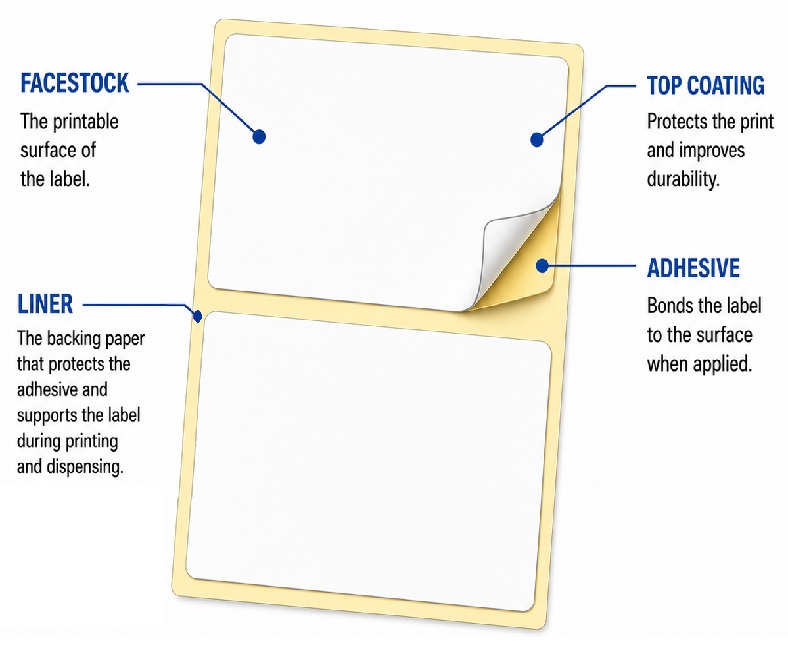
A liner (also known as release liner or backing paper) is the protective layer attached to the adhesive side of a label.
Its primary purpose is to:
|
Without the liner, pressure-sensitive labels could not be stored, transported, or printed efficiently because the adhesive would stick to surrounding surfaces.
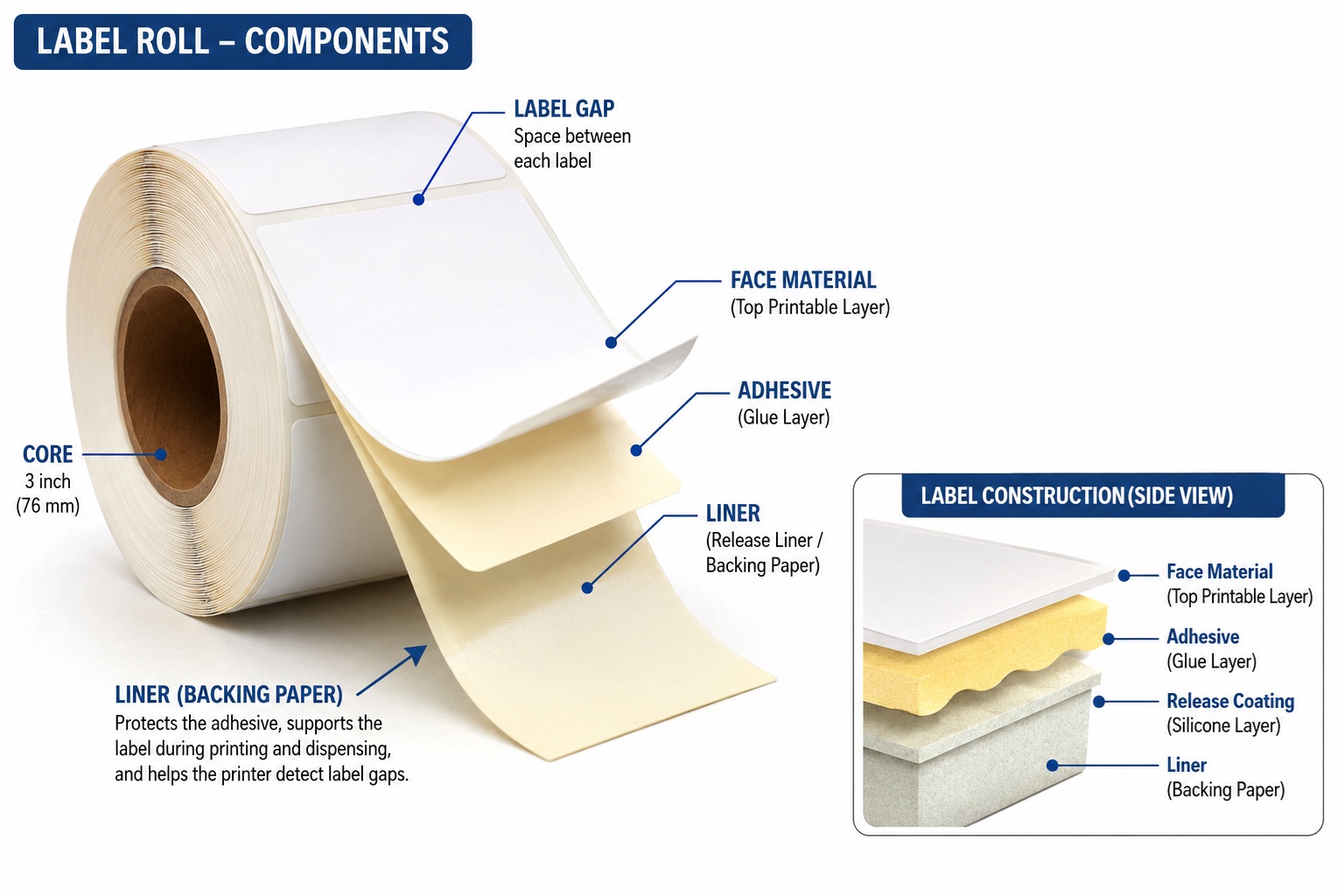
Parts of a Typical Label Roll
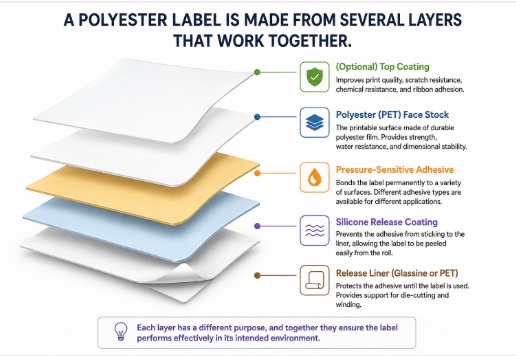
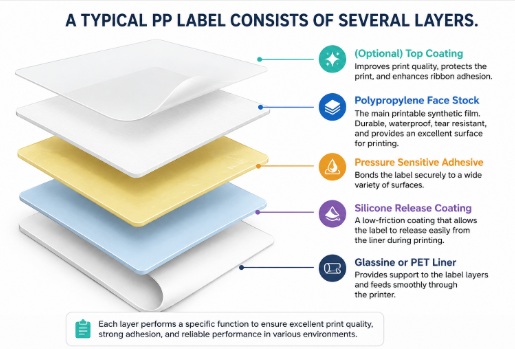
A standard self-adhesive label consists of four layers:
- Face Material
- Thermal paper
- Thermal transfer paper
- PP
- PET
- Vinyl
- Adhesive
- Permanent
- Removable
- Freezer
- High-tack
- Release Coating (Silicone)
- Allows the label to peel away easily.
- Release Liner
- Usually made from glassine paper, kraft paper, or PET film.
The liner is the foundation that holds everything together until the label is applied.
Why Is the Liner So Important?
Many printing problems blamed on the printer are actually caused by poor-quality liners.
A good liner provides:
- Smooth feeding
- Stable printing
- Accurate label positioning
- Reliable sensor detection
- Better print quality
- Reduced printer wear
- Less label waste
A poor liner can cause:
- Labels skipping
- Multiple labels feeding
- Media calibration errors
- "Paper Out" messages
- Label jams
- Wrinkled labels
- Misaligned printing
What Materials Are Label Liners Made From?
1. Glassine Liner (Most Popular)
Glassine is a smooth, dense paper treated to create a glossy surface.
Advantages:
- Excellent printer feeding
- Good transparency
- Accurate sensor detection
- Lower cost
- Widely used for barcode labels
Typical weight:
- 55–65 GSM
This is the preferred liner for most desktop and industrial barcode printers.
2. Kraft Liner
Kraft liners are thicker and stronger.
Advantages:
- Higher tear resistance
- Suitable for heavy industrial labels
- Better for manual dispensing
Disadvantages:
- Less transparent
- Larger roll diameter
- Reduced labels per roll
3. PET Film Liner
PET liners are used for premium industrial labels.
Advantages:
- Waterproof
- Chemical resistant
- Excellent dimensional stability
- Suitable for harsh environments
Typically used with polyester labels.
What Does Liner Thickness Mean?
Liner thickness refers to the physical thickness of the backing paper, usually measured in microns (µm) rather than GSM.
Typical barcode label liners range between:
- 48–60 microns
The thicker the liner:
- the stronger it becomes,
- but the less light passes through it.
Recommended Liner GSM
|
Liner Type |
GSM |
Approx. Thickness |
Sensor Detection |
|
Glassine 55 GSM |
55 GSM |
48–52 µm |
★★★★★ Excellent |
|
Glassine 60 GSM |
60 GSM |
52–56 µm |
★★★★★ Excellent |
|
Glassine 62 GSM |
62 GSM |
54–58 µm |
★★★★☆ Excellent |
|
Glassine 65 GSM |
65 GSM |
56–60 µm |
★★★☆☆ Good |
|
Kraft 80 GSM |
80 GSM |
85–95 µm |
★★☆☆☆ less common for desktop printers |
GSM vs Thickness – What's the Difference?
Many people believe GSM tells the whole story.
It doesn't.
GSM measures paper weight.
Microns measure physical thickness.
Two liners may both weigh 60 GSM but have different thicknesses depending on the paper composition and manufacturing process.
For barcode printers, thickness is often more important than GSM because the printer's sensor relies on how much light passes through the liner.
Why Does Liner Thickness Affect Label Detection?
Most barcode printers use a transmissive (gap) sensor.
This sensor shines light upward through the liner.
When light passes through the gap between labels, the printer detects where one label ends and the next begins.
If the liner is too thick, too opaque, or inconsistent, less light reaches the sensor, making gap detection less reliable.
Possible issues include:
- Skipping labels
- Printing across two labels
- Incorrect calibration
- Continuous feeding
- Paper-out errors
How Barcode Printers Detect Labels
Most printers use one of two sensor technologies.
Gap Sensor (Transmissive)
The sensor shines light through the liner.
Best suited for:
- White glassine liners
- Consistent liner thickness
- Die-cut labels with gaps
Common in printers from:
- Zebra
- Honeywell
- TSC
- Godex
- Citizen
- Toshiba
- SATO
Black Mark Sensor (Reflective)
Instead of detecting light through the liner, the printer looks for a black mark printed on the back.
This method is commonly used for:
- Wristbands
- Tickets
- Tags
- Specialty labels
Because the sensor reads the black mark, liner thickness has less influence on detection accuracy.
What Is the Ideal Liner Thickness?
For most barcode labels, the industry standard is:
|
Liner Specification |
Recommendation |
|
Material |
White Glassine |
|
Weight |
60 GSM |
|
Thickness |
54–56 µm |
|
Release Coating |
Silicone |
|
Sensor Performance |
Excellent |
This combination offers a balance of durability, feeding performance, and accurate sensor detection.
What Happens If the Liner Is Too Thin?
Very thin liners (around 40–45 GSM) may:
- Stretch during printing
- Tear easily
- Wrinkle
- Slip on rollers
- Cause print registration problems
- Increase downtime
What Happens If the Liner Is Too Thick?
Excessively thick liners may:
- Reduce sensor sensitivity
- Require recalibration
- Increase roll diameter
- Reduce labels per roll
- Create feeding resistance
- Cause skipped labels in some printers
Why Consistent Liner Thickness Is More Important Than Maximum Thickness
A consistent liner thickness across the entire roll is often more important than simply choosing a thicker liner.
Poor manufacturing can result in thickness variations that confuse the printer's sensor, leading to inaccurate label positioning.
High-quality label manufacturers maintain tight tolerances so every label feeds consistently from the beginning to the end of the roll.
Tips for Choosing High-Quality Label Rolls
When purchasing labels, consider more than just the label size.
Look for:
- Consistent liner thickness
- High-quality glassine paper
- Uniform silicone release coating
- Strong die-cut accuracy
- Smooth roll winding
- Stable adhesive performance
- Clean edges with minimal dust
These features improve print quality and extend the life of your printer.
Common Questions
Is a thicker liner always better?
No. A liner that is too thick may reduce light transmission and affect gap sensor detection. The best choice is a liner designed for barcode printing, typically around 60 GSM with consistent thickness.
Can poor liners damage my printer?
While they may not directly damage the printer, poor-quality liners can produce excess dust, cause paper jams, increase wear on rollers, and lead to unnecessary downtime.
Why do some cheap labels skip during printing?
In many cases, the issue is inconsistent liner quality, poor die-cutting, or uneven thickness, which prevents the printer's sensor from accurately detecting each label.
Conclusion
The liner may be hidden beneath every label, but it is one of the most important components in the entire label construction. It protects the adhesive, supports the label during printing, and enables barcode printers to detect each label accurately.
Selecting labels with a high-quality, consistently manufactured liner can improve print reliability, reduce waste, minimize downtime, and extend the life of your printer. While face material and adhesive often receive the most attention, the liner is the foundation that keeps the entire labeling process running smoothly.
Whether you're printing shipping labels, barcode labels, product labels, or asset tags, paying attention to liner quality and thickness is an investment in better printing performance and long-term reliability.
Continue gaining knowledge