What Is a 1D Barcode? Complete Guide to Linear Barcodes
If you've ever purchased groceries, received a shipping package, or checked out a book from a library, you've already used a 1D barcode, also known as a linear barcode.
Although QR Codes have become increasingly popular, 1D barcodes remain the world's most widely used automatic identification technology. Millions of products are scanned every day using these simple yet highly reliable barcode symbols.
In this guide, we'll explain what a 1D barcode is, how it works, where it is used, its advantages and limitations, and how it compares with newer 2D barcode technologies.
What Is a 1D (Linear) Barcode?
A 1D barcode is a series of parallel black bars and white spaces of varying widths that represent data.
Unlike a QR Code, which stores information both horizontally and vertically, a 1D barcode stores information only in one direction (left to right).
This is why it is called a Linear Barcode.
The barcode itself does not contain words or numbers. Instead, each combination of bars and spaces represents characters according to predefined barcode standards.
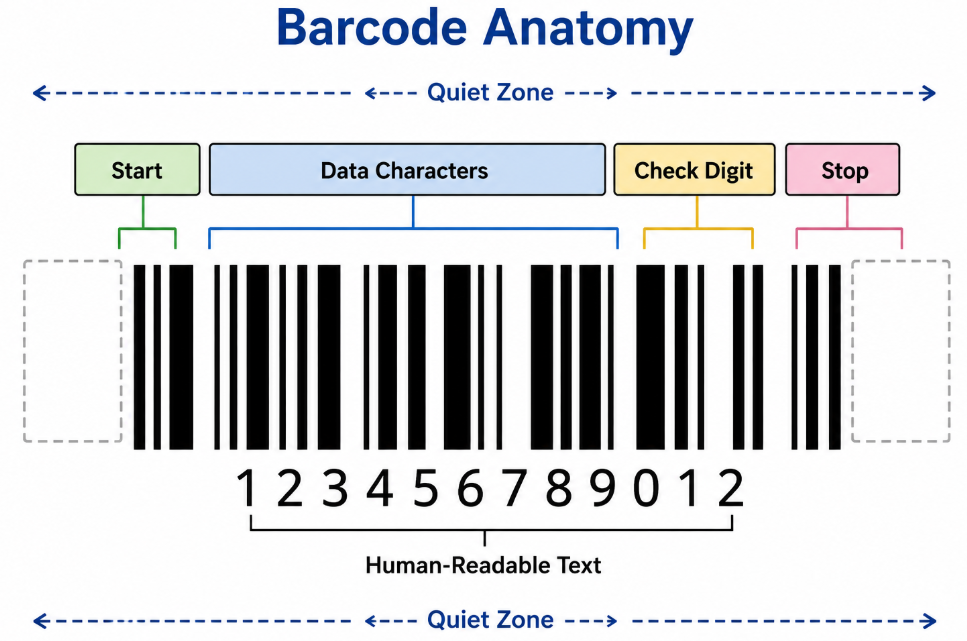
Illustration
Human Readable Text
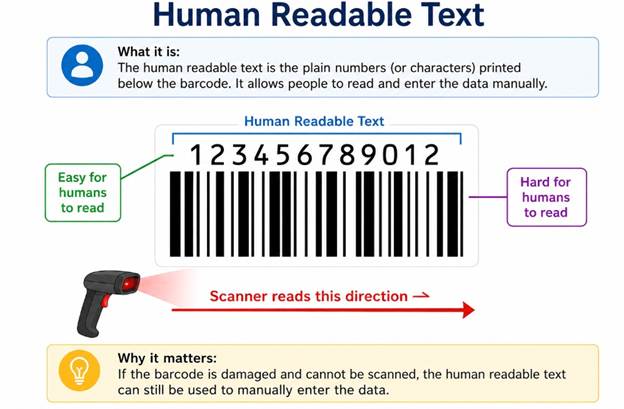
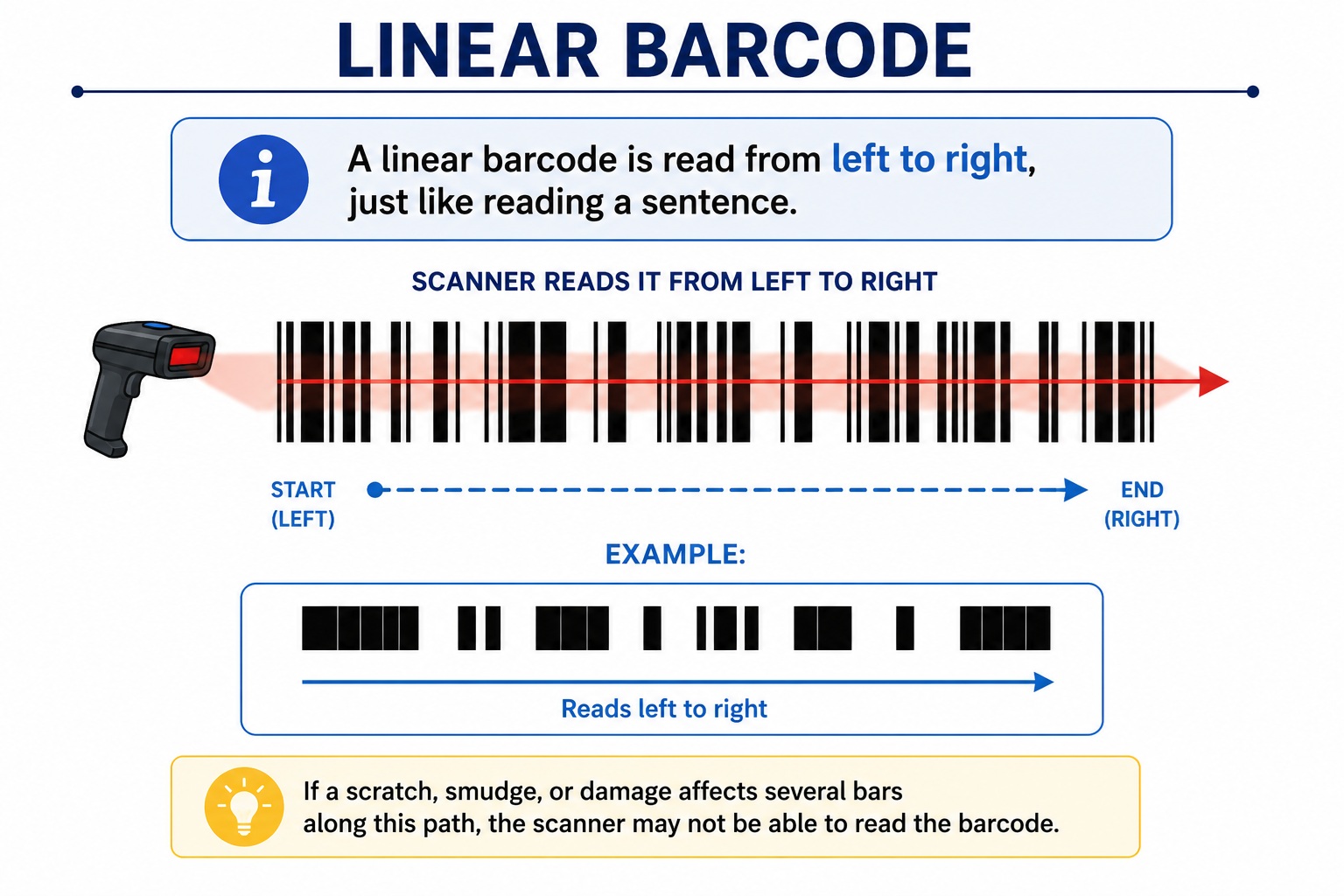
Scanner reads this direction →
Why Is It Called a Linear Barcode?
The scanner reads the barcode across a single horizontal line.
The laser or imaging scanner measures:
- Width of each black bar
- Width of each white space
- Start pattern
- Stop pattern
It converts these measurements into numbers and letters.
Unlike QR Codes, there is no vertical information.
How Does a 1D Barcode Work?
Every barcode follows a simple process.
Step 1 – Data Encoding
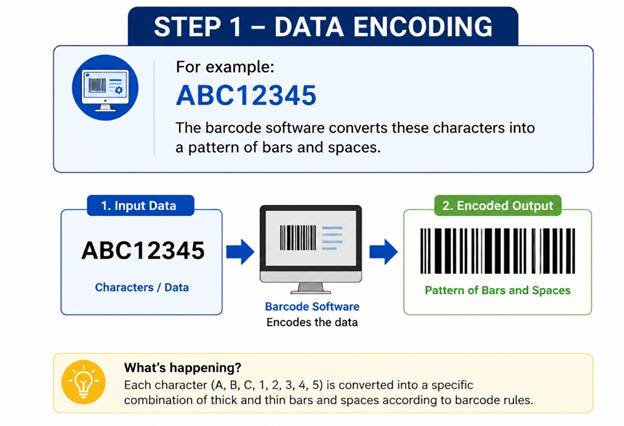
The barcode software converts these characters into a pattern of bars and spaces.
Step 2 – Printing
The barcode is printed onto:
- Product labels
- Shipping labels
- Inventory tags
- Asset labels
- Retail packaging
Step 3 – Scanning
The scanner shines a laser or LED light across the barcode.
Dark bars absorb light.
White spaces reflect light.
The scanner measures these reflections.
Step 4 – Decoding
The barcode scanner converts the pattern back into the original information.
Example:
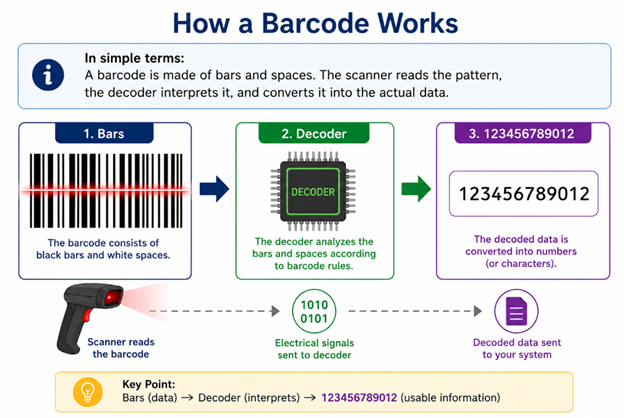
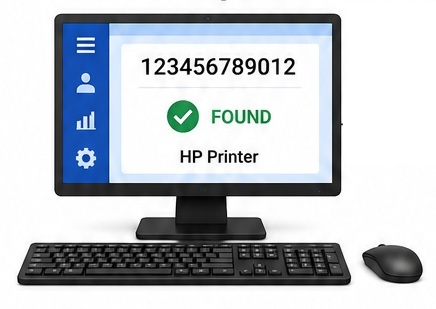
Bars → Decoder → 123456789012
The connected computer then retrieves product information from a database.
Components of a Linear Barcode
Every 1D barcode consists of several important parts.
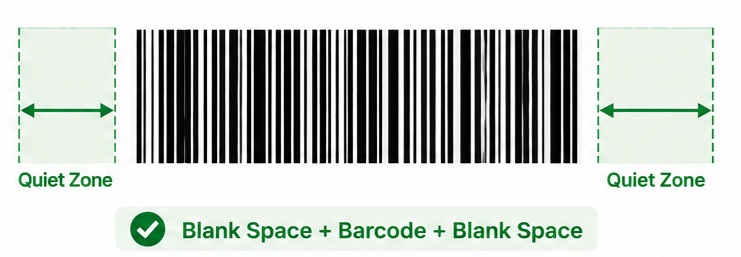
Quiet Zone
The blank space before and after the barcode.
Without it, scanners may fail.
(See our article What Is a Quiet Zone in a Barcode?)
Start Character
Indicates where the barcode begins.
Data Characters
The actual encoded information.
Check Digit (Some Symbologies)
Used to verify that the barcode has been read correctly.
Stop Character
Indicates the end of the barcode.
Common Types of 1D Barcodes
Code 128
One of the most popular barcode types.
Features:
- High density
- Supports all ASCII characters
- Excellent for logistics
- Used worldwide
Applications:
- Shipping
- Warehouses
- Manufacturing
- Healthcare
Code 39
One of the oldest barcode standards.
Supports:
- Letters
- Numbers
- Some symbols
Used in:
- Military
- Automotive
- Asset tracking
EAN-13
The international retail barcode.
Found on nearly every supermarket product.
Contains:
- Country code
- Manufacturer code
- Product code
- Check digit
UPC-A
Common in North America.
Mostly used in:
- Retail
- Grocery stores
Interleaved 2 of 5 (ITF)
Designed for numeric data.
Popular in:
- Cartons
- Warehouse labels
- Logistics
Codabar
Used mainly in:
- Blood banks
- Libraries
- Medical laboratories
Advantages of 1D Barcodes
Simple
Easy to generate and print.
Low Cost
Requires minimal printing quality.
Fast Scanning
Laser scanners can decode almost instantly.
Reliable
When printed correctly, accuracy exceeds 99.9%.
Universally Supported
Almost every barcode scanner supports major 1D barcode standards.
Limitations of Linear Barcodes
Despite their popularity, linear barcodes have limitations.
Limited Data Capacity
Most linear barcodes store only:
- Product numbers
- IDs
- Serial numbers
They cannot store large amounts of information.
Requires Database Lookup
The barcode usually stores only an identification number.
The computer must retrieve the actual product information.
Requires Horizontal Space
Long data means a physically wider barcode.
Easily Damaged
A scratch across the barcode can prevent scanning.
Where Are 1D Barcodes Used?
They appear almost everywhere.
Retail
- Supermarkets
- Department stores
- Convenience stores
Warehouses
- Pallets
- Cartons
- Shelf labels
Logistics
- Shipping labels
- Courier parcels
- Freight tracking
Manufacturing
- Production tracking
- Work orders
- Component identification
Healthcare
- Patient wristbands
- Laboratory samples
- Medical equipment
Libraries
- Books
- Membership cards
Asset Management
- Office equipment
- Computers
- Tools
How Much Data Can a 1D Barcode Store?
It depends on the barcode type.
Typical capacity:
|
Barcode |
Capacity |
|
Code 39 |
Up to about 43 characters |
|
Code 128 |
Around 80+ characters (depending on size) |
|
EAN-13 |
13 digits |
|
UPC-A |
12 digits |
|
ITF |
Numeric only |
Although some symbologies support longer strings, practical limits depend on label size, print resolution, and scanner capabilities.
Best Practices for Printing 1D Barcodes
To ensure reliable scanning:
- Leave sufficient quiet zones.
- Use high-contrast colors (black on white is ideal).
- Print at an appropriate resolution.
- Avoid stretching or compressing the barcode disproportionately.
- Keep the barcode clean and free from scratches.
- Test with the intended scanner before mass production.
1D Barcode vs 2D Barcode
|
Feature |
1D Barcode |
2D Barcode |
|
Data Direction |
Horizontal only |
Horizontal and vertical |
|
Shape |
Long rectangle |
Square or rectangle |
|
Storage Capacity |
Low |
Very high |
|
Error Correction |
Minimal |
Built-in (varies by symbology) |
|
Typical Examples |
Code 128, Code 39, EAN-13 |
QR Code, Data Matrix, PDF417 |
|
Scanner Type |
Laser or imaging scanner |
Imaging scanner or camera |
When Should You Use a 1D Barcode?
A 1D barcode is the best choice when:
- You only need to encode a product ID or serial number.
- Fast scanning is important.
- Labels are narrow but have enough horizontal space.
- Compatibility with existing laser scanners is required.
- You need a cost-effective and proven solution.
If you need to store more information directly in the symbol, such as URLs, contact details, or manufacturing records, a 2D barcode may be more suitable.
Frequently Asked Questions (FAQ)
Is a 1D barcode the same as a linear barcode?
Yes. The terms 1D barcode and linear barcode refer to the same type of barcode.
Can a smartphone scan a 1D barcode?
Yes. Most modern smartphones can scan common 1D barcodes using the camera, although dedicated barcode scanners are generally faster and more reliable in commercial environments.
Which is the most common 1D barcode?
For retail products, EAN-13 (globally) and UPC-A (North America) are the most common. In logistics and warehousing, Code 128 is widely used.
Can a 1D barcode store text?
Yes. Some symbologies, such as Code 128 and Code 39, can encode letters, numbers, and certain symbols.
Are 1D barcodes becoming obsolete?
No. While 2D barcodes are growing in popularity, 1D barcodes continue to be used extensively in retail, logistics, manufacturing, healthcare, and many other industries due to their simplicity, speed, and widespread compatibility.
Final Thoughts
For over 50 years, 1D barcodes have been the backbone of automatic identification systems. They are simple, inexpensive, fast to scan, and supported by virtually every barcode scanner on the market.
Understanding how linear barcodes work, their strengths, and their limitations will help you choose the right barcode for your products, inventory, or business processes. Even as 2D barcodes become more common, 1D barcodes remain an essential technology across countless industries.