What Is a QR Code? Complete Beginner's Guide to QR Codes
What Is a QR Code?
Quick Response (QR) Codes have become one of the most widely used barcode technologies in the world. You see them on product packaging, restaurant menus, payment terminals, business cards, event tickets, advertisements, and even industrial equipment.
Unlike traditional barcodes, a QR Code can store a much larger amount of information while remaining compact and easy to scan. Most modern smartphones can read QR Codes without requiring any additional software, making them a popular way to share information instantly.
In this guide, you'll learn what a QR Code is, how it works, its advantages, common applications, and best practices for printing and scanning.
What Does QR Stand For?
QR stands for Quick Response.
The technology was developed in 1994 by the Japanese company Denso Wave, a subsidiary of Toyota, to improve the speed and accuracy of tracking automotive components during manufacturing.
Today, QR Codes are used worldwide in industries including retail, logistics, healthcare, education, manufacturing, and marketing.
What Is a QR Code?
A QR Code is a two-dimensional (2D) barcode that stores information using a pattern of black and white square modules arranged inside a square grid.
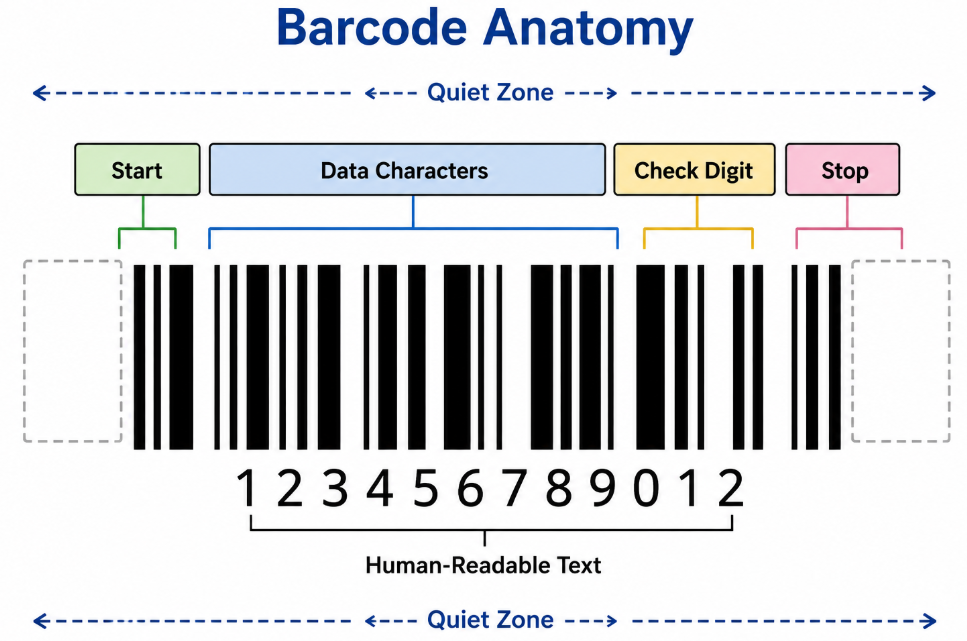
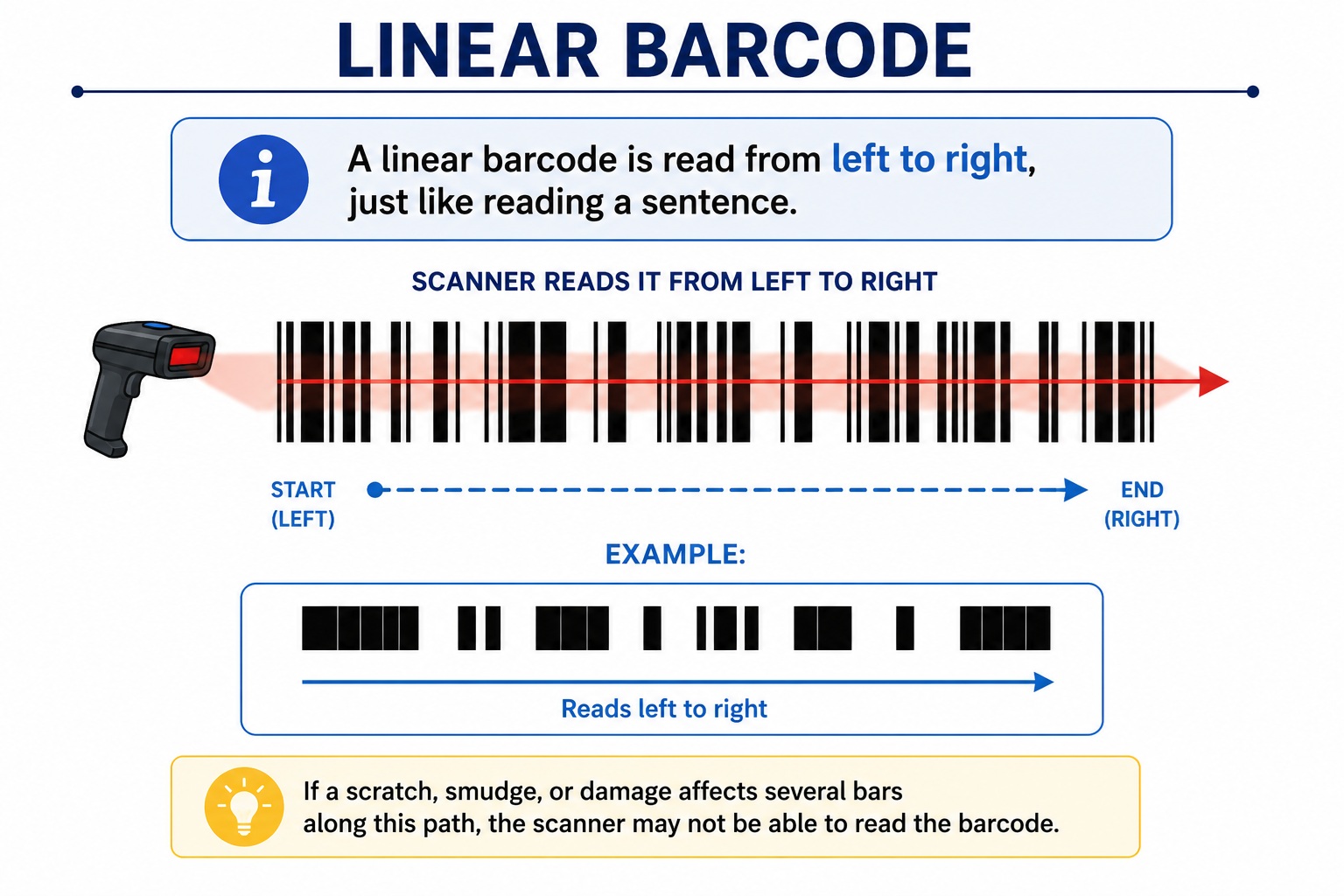
Unlike a traditional one-dimensional barcode that stores data horizontally, a QR Code stores data both horizontally and vertically, allowing it to hold much more information in a smaller space.
A QR Code can contain:
- Website URLs
- Product information
- Serial numbers
- Contact details
- Wi-Fi credentials
- Email addresses
- Phone numbers
- GPS locations
- Plain text
- Inventory information
What Does a QR Code Look Like?
A QR Code is easy to recognize because it contains three large square finder patterns in its corners. These help scanners determine the code's orientation so it can be read quickly, even if it is rotated.
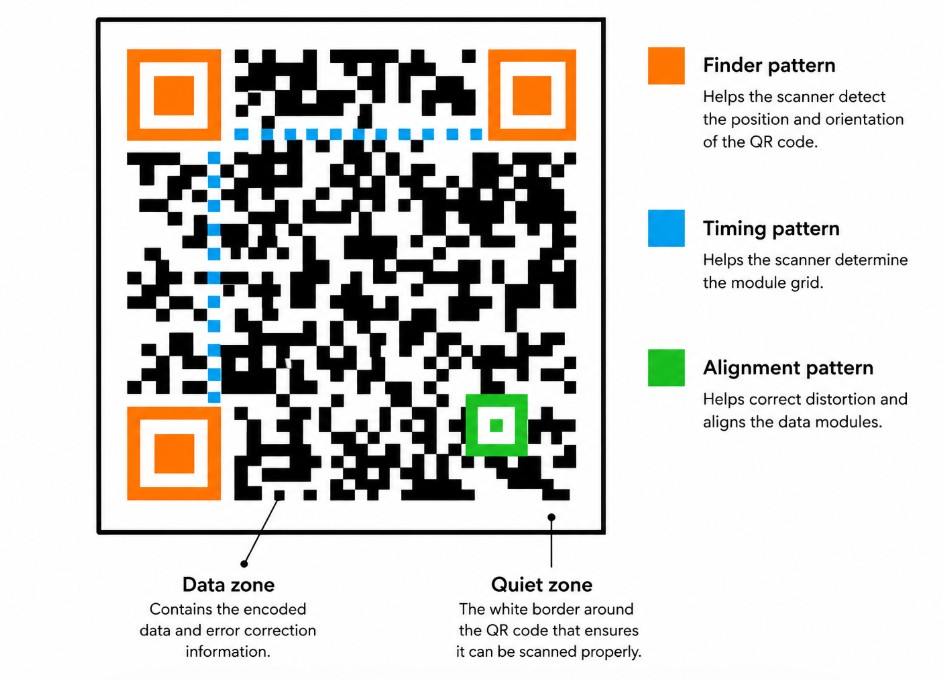
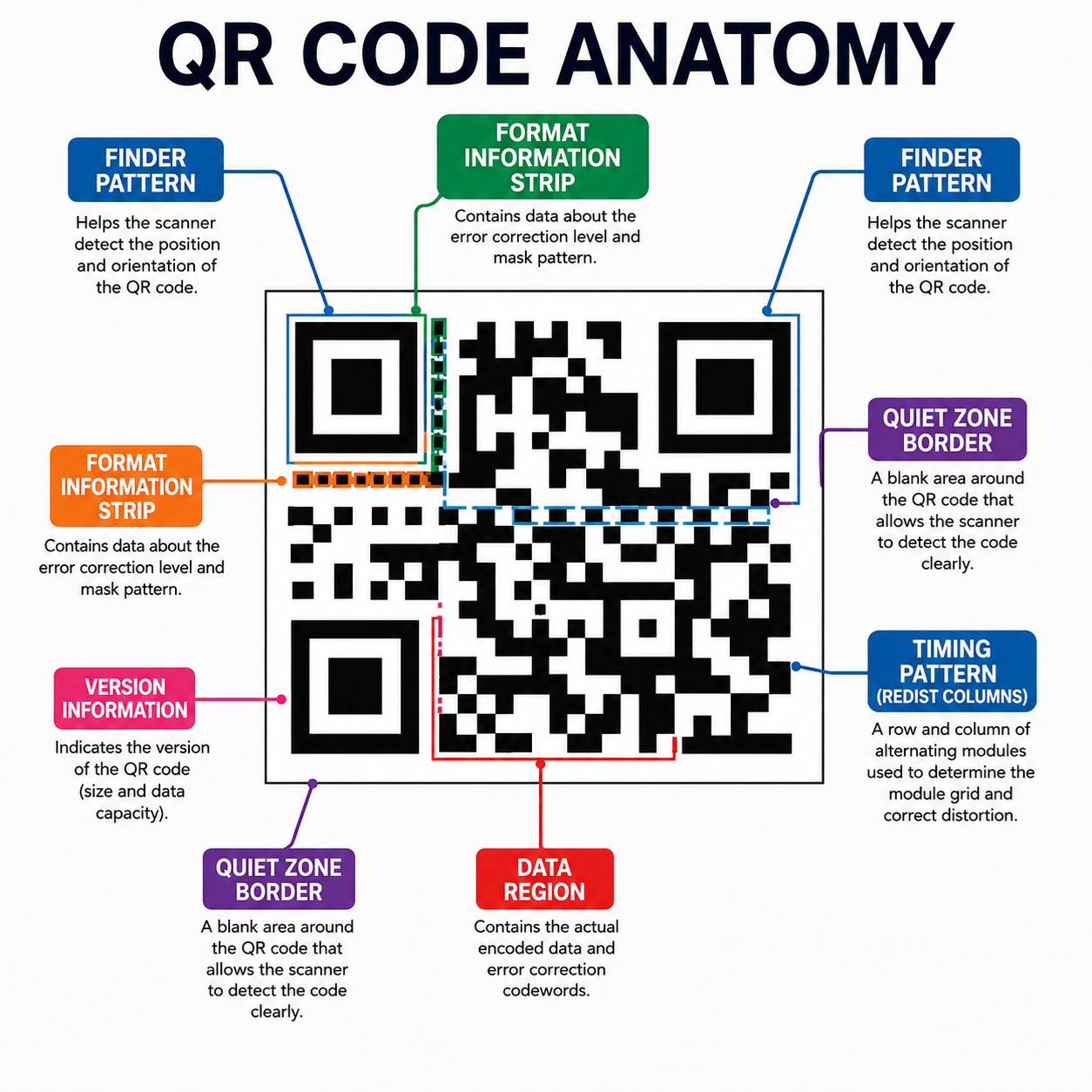
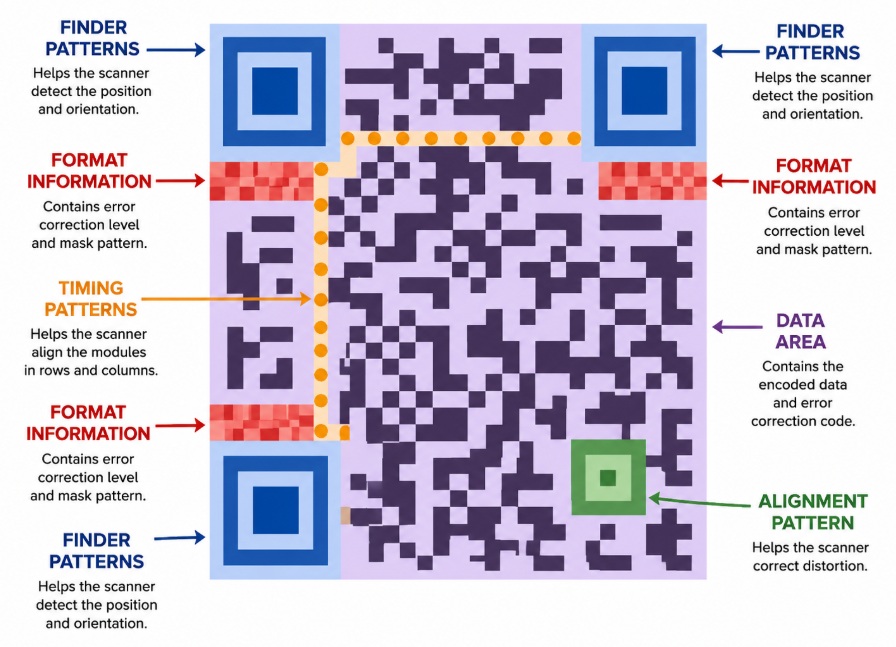
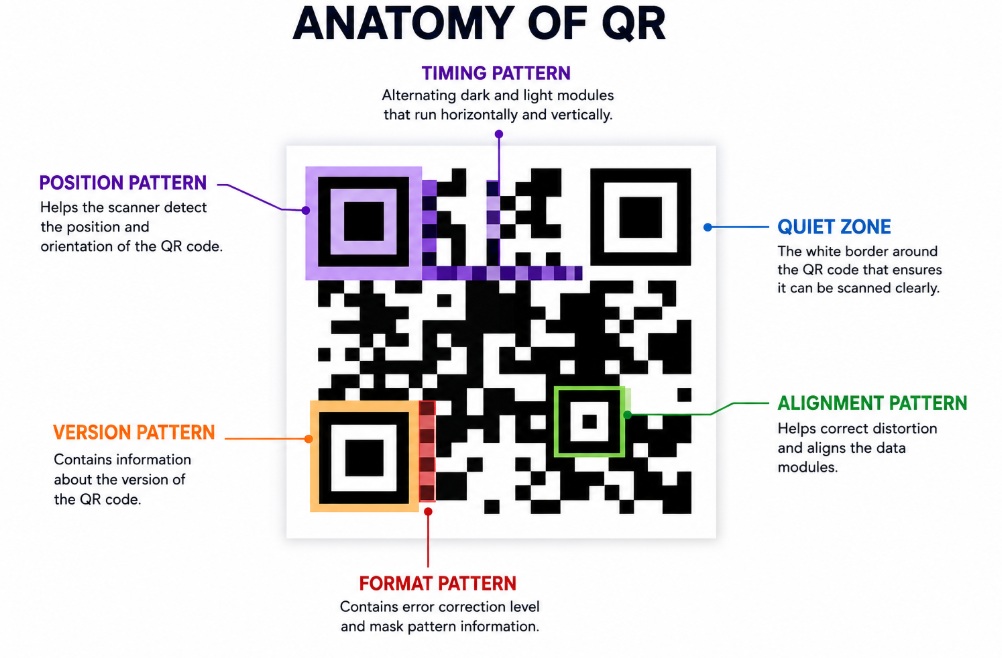
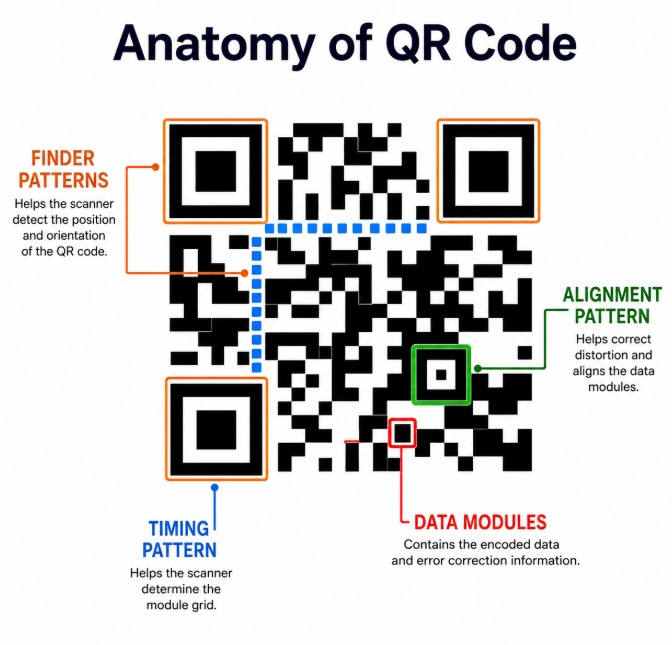
The main parts of a QR Code include:
- Finder Patterns – Large squares located in three corners that help determine orientation.
- Alignment Patterns – Smaller squares that improve reading accuracy on larger QR Codes.
- Timing Patterns – Alternating black and white modules that help identify the grid structure.
- Data Modules – The area where the encoded information is stored.
- Quiet Zone – A blank white border surrounding the QR Code that is essential for reliable scanning.
How Does a QR Code Work?
Creating a QR Code involves several steps:
Step 1 – Enter the Data
The information to be stored is entered into QR Code generation software.
For example:
https://www.gsq8.com
or
Product ID:
GSQ8-100025
Step 2 – Data Encoding
The software converts the information into binary data and applies QR Code encoding rules.
Step 3 – Error Correction
The QR Code includes Reed–Solomon error correction, allowing it to remain readable even if part of the code is dirty, scratched, or partially covered.
Depending on the selected level, a QR Code can recover from approximately:
|
Level |
Recoverable Damage |
|
L |
About 7% |
|
M |
About 15% |
|
Q |
About 25% |
|
H |
About 30% |
Higher error correction improves durability but increases the number of modules required.
Step 4 – Printing
The generated QR Code is printed onto labels, packaging, documents, or products.
Good print quality is essential for reliable scanning.
Step 5 – Scanning
A smartphone or imaging barcode scanner captures the QR Code.
The scanner:
- Detects the finder patterns.
- Determines orientation.
- Reads the module pattern.
- Corrects any damaged areas.
- Decodes the stored information.
- Displays the result to the user.
How Much Information Can a QR Code Store?
The storage capacity depends on the QR Code version and the type of data being encoded.
Approximate maximum capacities include:
|
Data Type |
Maximum Capacity |
|
Numeric |
7,089 digits |
|
Alphanumeric |
4,296 characters |
|
Binary Data |
2,953 bytes |
|
Kanji |
1,817 characters |
As more information is added, the QR Code becomes denser and requires a larger printed size for dependable scanning.
Static vs Dynamic QR Codes
Static QR Codes
The encoded information is permanent.
Once created, it cannot be changed without generating a new QR Code.
Suitable for:
- Product identification
- Serial numbers
- Fixed websites
- Equipment labels
Dynamic QR Codes
The QR Code points to a redirect service rather than directly storing the final destination.
This allows the destination to be changed later without replacing the printed QR Code.
Suitable for:
- Marketing campaigns
- Promotional offers
- Restaurant menus
- Product catalogs
- Visitor tracking
Common Uses of QR Codes
Retail
- Product information
- Digital payments
- Customer promotions
- Warranty registration
Warehousing
- Inventory tracking
- Picking operations
- Asset management
- Equipment identification
Healthcare
- Patient identification
- Laboratory samples
- Medication tracking
- Medical equipment labeling
Manufacturing
- Production tracking
- Component identification
- Quality control
- Traceability
Marketing
- Website links
- Social media
- App downloads
- Event registration
Education
- Online learning resources
- Attendance
- Library systems
- Course materials
Advantages of QR Codes
- Stores significantly more information than a traditional barcode.
- Can be scanned from any direction.
- Includes built-in error correction.
- Works with most smartphones.
- Supports many types of information.
- Suitable for both industrial and consumer applications.
- Easy to generate and print.
- Widely recognized around the world.
Limitations of QR Codes
- Very small QR Codes may be difficult to scan.
- Poor print quality can reduce readability.
- Missing quiet zones often cause scan failures.
- Low-contrast printing affects scanning performance.
- Older laser barcode scanners cannot read QR Codes because they require an area imaging scanner or a smartphone camera.
Best Practices for Printing QR Codes
- Always include a proper quiet zone around the QR Code.
- Use high-contrast black printing on a white background whenever possible.
- Avoid stretching or distorting the QR Code.
- Print at a size appropriate for the expected scanning distance.
- Use quality labels and ribbons for durable applications.
- Test the QR Code with multiple devices before large-scale production.
- If using logos or custom designs, ensure they do not interfere with the finder patterns or reduce the available error correction margin.
Frequently Asked Questions
Can smartphones read QR Codes?
Yes. Most modern Android and iPhone devices can scan QR Codes directly using the built-in camera app.
Can a QR Code store a website?
Yes. One of the most common uses is storing a website URL that opens automatically after scanning.
Can QR Codes be damaged?
Yes, but thanks to built-in error correction, many QR Codes remain readable even if part of the symbol is damaged.
Can I print a QR Code on a label?
Yes. QR Codes are commonly printed on thermal transfer labels, synthetic labels, and product packaging. The correct label material, ribbon, and printer settings help ensure reliable scanning.
Is a QR Code better than a traditional barcode?
It depends on the application. QR Codes are ideal when you need to store more information or support smartphone scanning. Traditional linear barcodes remain an excellent choice for simple product identification and high-speed retail scanning.
Conclusion
QR Codes have transformed the way information is shared by storing large amounts of data in a compact, easy-to-scan format. Their fast scanning, built-in error correction, and compatibility with smartphones make them suitable for industries ranging from retail and healthcare to manufacturing and logistics.
For the best results, ensure QR Codes are printed with adequate contrast, a proper quiet zone, and the correct size for the intended scanning distance. Following these best practices will help achieve reliable scanning and a better user experience.