203 DPI vs 300 DPI vs 600 DPI Label Printers: Which Print Resolution Do You Need?
When buying a barcode or label printer, one specification you will almost always see is 203 DPI, 300 DPI, or 600 DPI.
But what does DPI actually mean?
Does a 300 DPI printer produce better labels than a 203 DPI printer? Is 600 DPI worth the additional cost? And do you really need a higher-resolution printer just to print sharper barcodes?
The answer depends mainly on what you are printing, how small it needs to be, and the size of your labels.
For many everyday applications, 203 DPI is perfectly adequate. For smaller labels, fine text and compact barcodes, 300 DPI can make a noticeable difference. And for very small, highly detailed printing, 600 DPI may be the right choice.
This guide explains the differences so you can choose the right label printer resolution without paying for more DPI than you actually need.
What Does DPI Mean on a Label Printer?
DPI stands for dots per inch.
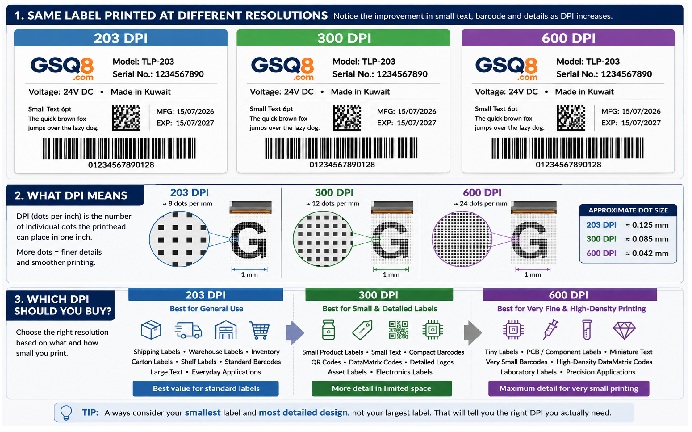
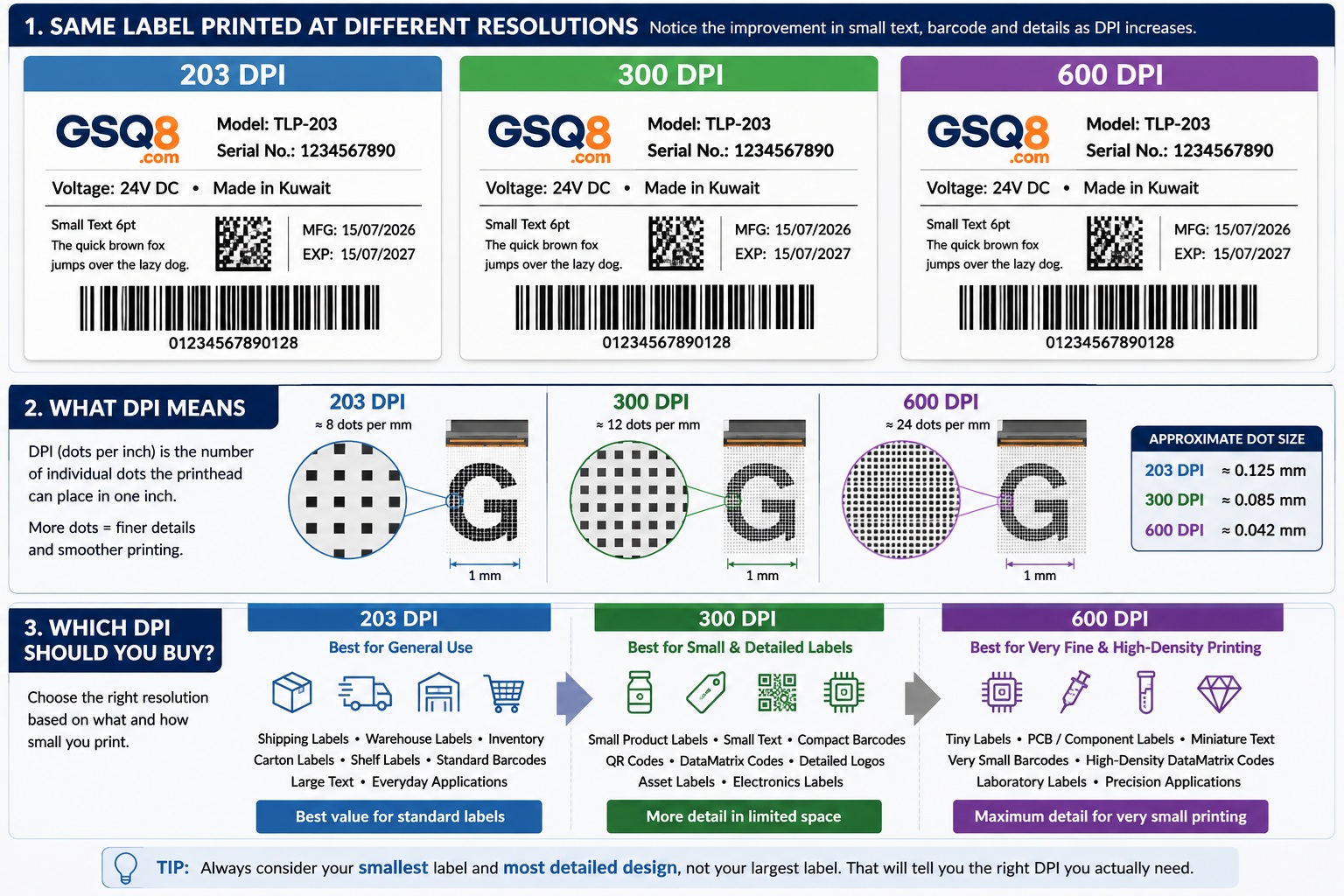
A thermal printer creates an image by heating tiny individual elements, or dots, across the printhead. The DPI rating tells you approximately how many of these dots are available within one inch.
The common resolutions are:
- 203 DPI – approximately 8 dots per millimetre
- 300 DPI – approximately 12 dots per millimetre
- 600 DPI – approximately 24 dots per millimetre
Higher DPI therefore allows the printer to create smaller details.
Think of it like drawing an image using square blocks. If you have more, smaller blocks available in the same area, you can reproduce finer details and smoother edges.
This becomes particularly important when printing very small text, narrow barcode elements, logos, symbols and compact 2D codes.
203 DPI Label Printers
203 DPI is the most common resolution for general-purpose thermal label printing.
For many businesses, it is also the most economical choice.
A 203 DPI printer is usually ideal for:
- Shipping labels
- Courier labels
- Warehouse labels
- Inventory labels
- Carton identification
- Retail barcode labels
- Shelf labels
- General product identification
- Medium and large text
- Standard-size 1D barcodes
If you are printing a typical 100 × 150 mm shipping label, for example, there is normally little reason to purchase a 600 DPI printer simply to obtain higher resolution.
A properly configured 203 DPI printer using good-quality labels can produce excellent, highly readable barcodes.
Advantages of 203 DPI
203 DPI printers are generally more affordable and are available in a very wide range of desktop, commercial and industrial models.
They are an excellent choice when your labels contain normal-sized text and barcodes.
For high-volume operations printing relatively large labels, 203 DPI can also provide a very practical balance between print quality, speed and operating cost.
Where 203 DPI Starts to Become Limited
The limitations become noticeable when you try to fit a lot of information into a very small area.
Tiny text may become less defined, very small graphics can lose detail, and compact barcodes or 2D codes can become more difficult to reproduce accurately.
This is where 300 DPI becomes useful.
300 DPI Label Printers
For many applications requiring additional detail, 300 DPI is the sweet spot.
It provides substantially more printing detail than 203 DPI without moving into the specialised territory of 600 DPI.
300 DPI is particularly useful for:
- Small product labels
- Asset identification labels
- Electronics labels
- Small barcode labels
- Detailed logos
- Small fonts
- Compact QR codes
- DataMatrix codes
- Labels containing a lot of information
- Applications where available label space is limited
Imagine that you have to place a product name, model number, serial number, barcode, company logo and several lines of text on a relatively small label.
At 203 DPI, you may need to make some elements larger than you would prefer to maintain clarity.
At 300 DPI, the printer has more dots available to reproduce those details.
Does 300 DPI Look Better Than 203 DPI?
Yes, particularly with small elements.
If you print large text and a large barcode, however, the difference may not be very noticeable.
This is an important point:
Higher DPI does not automatically make every label dramatically better.
The smaller and more detailed the label becomes, the more valuable the additional resolution becomes.
600 DPI Label Printers
600 DPI thermal printers are designed for applications where very fine detail is required.
At approximately 24 dots per millimetre, a 600 DPI printhead can reproduce details that would be difficult or impossible to reproduce reliably using a lower-resolution printer.
Typical applications include:
- Very small electronic component labels
- PCB identification
- Tiny DataMatrix codes
- Very small serial-number labels
- Laboratory applications
- High-density identification labels
- Miniature product labels
- Very small fonts
- Applications requiring extremely fine graphics
600 DPI is impressive, but that does not mean every business should buy a 600 DPI printer.
For ordinary shipping, warehouse and retail barcode labels, it is often unnecessary.
You are paying for precision that your particular label design may never use.
203 DPI vs 300 DPI vs 600 DPI
Here is a simple way to compare the three resolutions.
|
Application |
203 DPI |
300 DPI |
600 DPI |
|
Shipping labels |
Excellent |
Excellent |
Usually unnecessary |
|
Warehouse labels |
Excellent |
Excellent |
Usually unnecessary |
|
Standard barcodes |
Excellent |
Excellent |
Usually unnecessary |
|
Product labels |
Good |
Excellent |
Excellent |
|
Small text |
Limited |
Good |
Excellent |
|
Small barcodes |
Limited |
Very good |
Excellent |
|
Detailed logos |
Good |
Very good |
Excellent |
|
Small QR/DataMatrix codes |
Limited |
Very good |
Excellent |
|
Electronics labels |
Limited |
Very good |
Excellent |
|
PCB/component labels |
Not ideal |
Depends on size |
Excellent |
|
Very tiny labels |
Not ideal |
Good |
Excellent |
The important lesson is that there is no universally "best" DPI.
There is only the right DPI for your application.
What Does DPI Actually Do to a Barcode?
This is where printer resolution becomes particularly interesting.
A barcode is made from precisely sized bars, spaces or cells. The printer has to construct these using individual dots.
At approximately:
203 DPI = 8 dots/mm
300 DPI = 12 dots/mm
600 DPI = 24 dots/mm
the physical size represented by each printed dot becomes progressively smaller.
Approximately:
- One 203 DPI dot = 0.125 mm
- One 300 DPI dot = 0.085 mm
- One 600 DPI dot = 0.042 mm
This means a higher-resolution printer gives label-design software more flexibility when creating very small barcode elements.
For a normal-sized barcode, this may not matter much.
For a very small barcode, it can matter a great deal.
Higher DPI Does Not Automatically Mean Better Barcode Scanning
This is an important misconception.
A barcode printed at 600 DPI is not automatically easier to scan than the same barcode printed correctly at 203 DPI.
Barcode readability also depends on factors such as:
- Barcode dimensions
- Quiet zones
- Print contrast
- Label material
- Ribbon quality
- Printer darkness setting
- Printing speed
- Printhead condition
- Barcode orientation and design
- Scanner capability
A clean, correctly sized 203 DPI barcode can scan much better than a poorly designed 600 DPI barcode.
Resolution is only one part of achieving reliable barcode printing.
When Should You Choose 203 DPI?
Choose 203 DPI when your application mainly involves standard-size labels and ordinary barcodes.
For example, if your business prints:
- 100 × 150 mm courier labels
- Carton labels
- Warehouse location labels
- General inventory labels
- Standard retail barcodes
203 DPI will normally provide everything you need.
There is little benefit in paying for 600 DPI simply because the number is higher.
For many businesses, 203 DPI offers the best value for general label printing.
When Should You Choose 300 DPI?
Choose 300 DPI when you need to fit more information onto smaller labels.
It is especially worth considering when your labels contain:
- Small fonts
- Compact barcodes
- QR or DataMatrix codes
- Fine logos
- Serial numbers
- Multiple lines of small text
If you are unsure whether 203 DPI will provide enough detail and your labels are relatively small, 300 DPI is often the safest middle ground.
It provides noticeably more flexibility without requiring the jump to a specialised 600 DPI printer.
When Do You Really Need 600 DPI?
Consider 600 DPI when the application itself requires extremely small printing.
For example, imagine printing identification information and a DataMatrix code onto a tiny electronic component label.
There may simply not be enough physical space to make everything larger.
Increasing the printer resolution allows more dots to be placed within that limited area.
That is exactly the type of application where 600 DPI makes sense.
For a large shipping label?
Probably not.
Is Higher DPI Always Better?
Technically, higher resolution provides greater printing precision.
But from a purchasing perspective, higher DPI is not automatically better.
A better question is:
Will my label design actually benefit from the additional resolution?
If the answer is no, buying a higher-resolution printer may simply increase your equipment cost without providing a meaningful improvement.
This is similar to buying a high-resolution professional camera when you only need to take simple identification photographs.
The extra capability exists, but you may never use it.
Does Higher DPI Make a Label Printer Slower?
Potentially.
Higher-resolution printing requires the printer to process and control more dots when creating the image.
However, actual print speed depends on the printer model, processor, memory, print settings, label design and manufacturer specifications.
You should therefore compare the specified printing speed of the actual printer models, rather than assuming that every 300 or 600 DPI printer will operate at a particular speed.
For high-volume warehouse or logistics applications, print speed can sometimes be more important than extremely high resolution.
Does Higher DPI Use More Thermal Transfer Ribbon?
This is another common misunderstanding.
Changing from 203 DPI to 300 DPI does not automatically mean that you consume more ribbon per label.
In a conventional thermal-transfer printer, ribbon consumption is primarily related to the physical length of ribbon advanced during printing.
If you print a 100 mm long label, approximately the corresponding length of ribbon passes through the printing mechanism regardless of whether the printhead is 203 or 300 DPI.
However, ribbon usage can vary depending on printer technology, ribbon-save features, label gaps and application settings.
The main reason to choose higher DPI should therefore be print-detail requirements, not ribbon consumption.
Direct Thermal vs Thermal Transfer: Does DPI Still Matter?
Yes.
Printer resolution is separate from the printing method.
A direct thermal printer creates the image directly on heat-sensitive label material.
A thermal transfer printer uses a thermal transfer ribbon to transfer an image onto the label.
Both printer types can be available in different resolutions.
Whether you need 203, 300 or 600 DPI still depends largely on the required size and detail of the printed information.
Label and Ribbon Quality Still Matter
Buying a high-resolution printer will not compensate for poor consumables.
With thermal-transfer printing, the printer, printhead, ribbon and label material work together as a system.
For example, different label materials may require different ribbon formulations such as:
- Wax
- Wax/resin
- Resin
Using an unsuitable ribbon can result in poor print density, smudging, weak durability or inconsistent barcode quality regardless of printer resolution.
Similarly, poor-quality labels can affect print performance and may contribute to premature printhead wear.
A good 203 DPI printer using correctly matched labels and ribbons can produce better practical results than a 300 DPI printer using unsuitable consumables.
Can You Upgrade a 203 DPI Printer to 300 DPI by Changing the Printhead?
Do not assume that you can simply remove a 203 DPI printhead and install a 300 DPI printhead.
Although some printer families are sold in multiple resolutions, changing resolution may involve more than the printhead itself.
Depending on the printer, there may be differences involving:
- Printer electronics
- Firmware
- Printhead identification
- Mechanical components
- Configuration
- Model-specific parts
Always check the printer manufacturer's specifications before attempting a resolution conversion.
If you think you may require 300 DPI in the future, it may be better to consider that requirement when purchasing the printer.
203 DPI vs 300 DPI: Which One Should Most Buyers Choose?
For general-purpose barcode and label printing, start by asking one simple question:
How small is the information I need to print?
If you are printing ordinary shipping, warehouse, inventory or retail barcode labels, 203 DPI is usually the practical and economical choice.
If your labels are smaller or contain small fonts, detailed graphics, compact barcodes or 2D codes, 300 DPI is often worth the additional investment.
If your application involves extremely small labels and highly detailed printing, 600 DPI may be necessary.
Do not buy based on the largest DPI number.
Buy based on the smallest detail you actually need to print.
Quick Buying Guide
Choose 203 DPI if:
You print normal-sized labels, shipping labels, warehouse labels and standard barcodes and want a cost-effective general-purpose solution.
Choose 300 DPI if:
You regularly print smaller labels, smaller text, detailed logos, compact barcodes or QR/DataMatrix codes and need additional flexibility.
Choose 600 DPI if:
You have a specialised application involving extremely small labels, tiny text, miniature barcodes or high-density 2D codes where very fine printing is essential.
Final Verdict: 203, 300 or 600 DPI?
For most buyers, more DPI should not be the goal. The correct DPI should be the goal.
203 DPI is excellent for everyday barcode, shipping, warehouse and inventory labels.
300 DPI is the better choice when labels become smaller and designs become more detailed.
600 DPI is a specialised solution for applications requiring extremely fine printing in very limited space.
Before buying a label printer, look at your smallest label and most detailed design, rather than your largest label.
That will usually tell you which resolution you really need.
Frequently Asked Questions
Is 300 DPI better than 203 DPI for barcode printing?
300 DPI provides greater printing resolution and is useful for smaller barcodes and detailed labels. However, standard-size barcodes can print and scan extremely well at 203 DPI when they are designed and printed correctly.
Is 203 DPI enough for shipping labels?
Yes. 203 DPI is generally more than adequate for standard shipping and courier labels containing normal-sized text and barcodes.
Is 300 DPI worth the extra cost?
It can be if you print small labels, small text, compact barcodes or detailed graphics. For large general-purpose labels, the difference may not justify the additional cost.
Do I need 600 DPI for QR codes?
Not necessarily. Many QR codes can be printed successfully at 203 or 300 DPI. 600 DPI becomes valuable when the code needs to be extremely small or the application requires very fine detail.
Does 600 DPI make barcodes scan better?
Not automatically. Correct barcode dimensions, contrast, quiet zones, printer settings, label material and print quality are also important.
Can a 203 DPI printer print small labels?
Yes. Label size itself does not determine the required resolution. The important factor is how small and detailed the printed elements on the label need to be.
Does higher DPI use more ribbon?
Not simply because the DPI is higher. In conventional thermal-transfer printing, ribbon consumption is mainly related to the physical ribbon length advanced through the printer.