Understanding Barcode Printer DPI: What 203, 300 & 600 DPI Mean and How Thermal Printheads Work
Introduction
When shopping for a barcode printer, one of the first specifications you'll notice is 203 DPI, 300 DPI, or 600 DPI. Many people assume that a higher DPI automatically means better print quality, but this is only partially true.
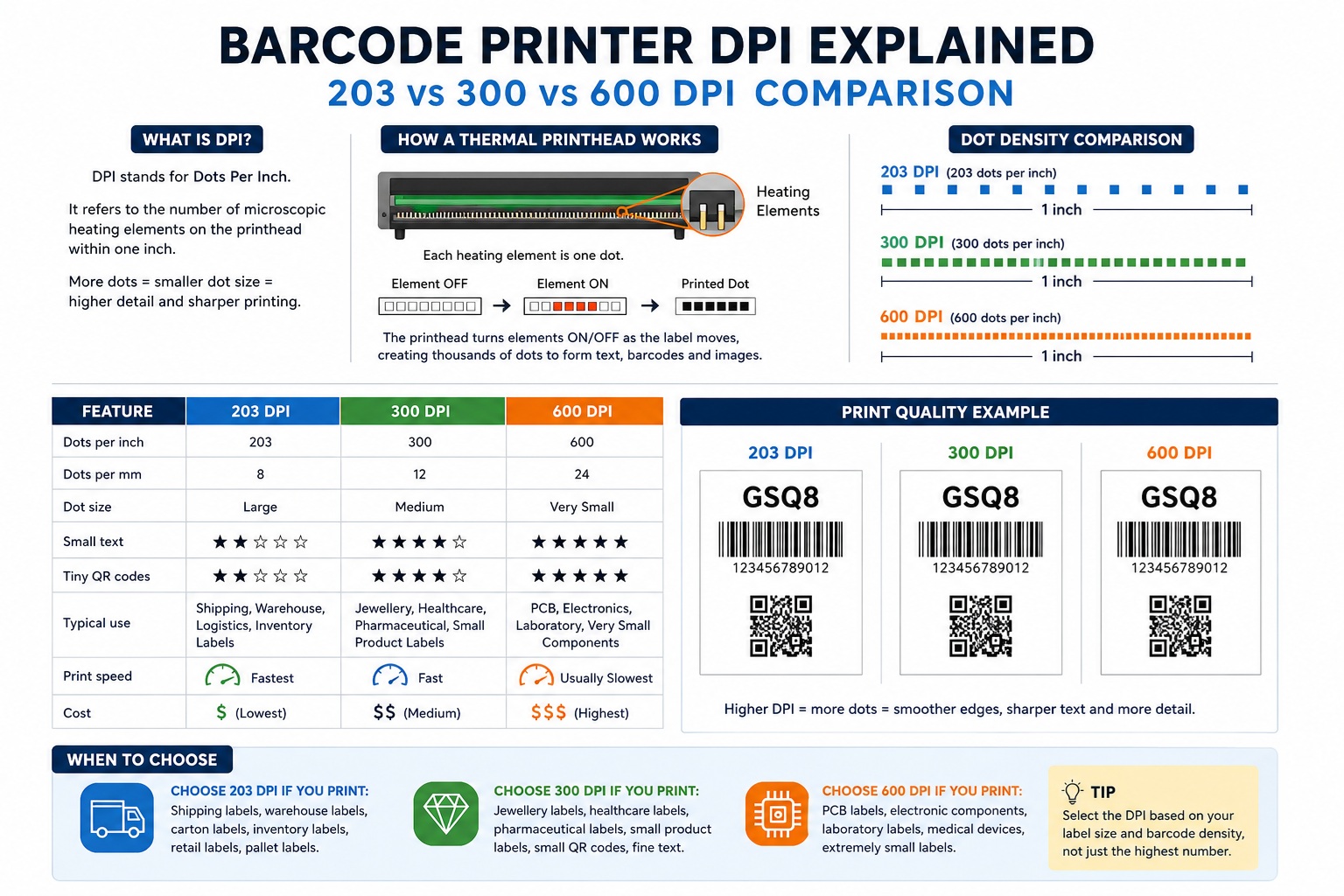
DPI, or Dots Per Inch, refers to the resolution of the thermal printhead. It determines how many tiny heating elements are positioned within one inch of the printhead. These heating elements create every barcode, QR Code, logo, graphic, and text printed by the printer.
Choosing the correct DPI is important because different applications require different levels of detail. A warehouse shipping label does not need the same resolution as a tiny jewellery label or an electronic circuit board label.
In this guide, you'll learn what DPI really means, how thermal printheads use it to create images, the differences between 203, 300, and 600 DPI, and how to choose the right resolution for your application.
What Does DPI Mean?
DPI stands for Dots Per Inch.
In a thermal barcode printer, it represents the number of microscopic heating elements arranged across one inch of the printhead.
Each heating element produces one printable dot.
For example:
- 203 DPI = 203 heating elements per inch
- 300 DPI = 300 heating elements per inch
- 600 DPI = 600 heating elements per inch
The higher the DPI, the more heating elements are packed into the same distance.
This allows the printer to create smaller dots, smoother curves, sharper text, and more detailed barcodes.
It is important to understand that DPI does not determine how dark the label prints. Instead, it determines how much detail the printer can reproduce.
How Does a Thermal Printhead Use DPI?
Inside every thermal printhead are hundreds or thousands of microscopic heating elements arranged in a perfectly straight line.
Each heating element functions like a tiny switch.
When electricity passes through an element, it generates heat for a fraction of a second.
That heat either:
- Activates the coating on a Direct Thermal label, or
- Melts ink from a Thermal Transfer ribbon onto the label.
As the label moves through the printer, the controller rapidly turns individual heating elements on and off.
Thousands of these tiny dots combine to create:
- Letters
- Numbers
- Barcodes
- QR Codes
- Logos
- Graphics
- Images
The more heating elements available per inch, the more accurately the printer can reproduce fine details.
Understanding Dot Size
One of the biggest misconceptions is that higher DPI produces darker printing.
This is incorrect.
Higher DPI simply means the printer creates smaller individual dots.
Imagine drawing a circle using large building blocks.
The edges appear rough because each block is relatively large.
Now imagine drawing the same circle using much smaller blocks.
The edges become smoother because there are more blocks available to create the curve.
Thermal printing works exactly the same way.
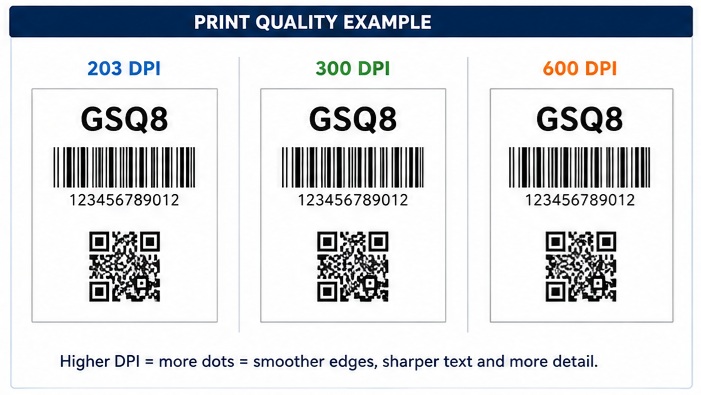
203 DPI
Uses larger dots.
Suitable for larger text and standard barcodes.
300 DPI
Uses smaller dots.
Produces smoother text and more detailed graphics.
600 DPI
Uses extremely small dots.
Capable of reproducing very fine text and extremely small barcodes.
203 DPI vs 300 DPI vs 600 DPI
Choosing the correct DPI depends on the size of your labels and the amount of detail you need to print.
|
Feature |
203 DPI |
300 DPI |
600 DPI |
|
Resolution |
203 dots/inch |
300 dots/inch |
600 dots/inch |
|
Dots per mm |
8 |
12 |
24 |
|
Dot Size |
Large |
Medium |
Very Small |
|
Barcode Detail |
Excellent |
Excellent |
Outstanding |
|
Small Text |
Good |
Excellent |
Outstanding |
|
Tiny QR Codes |
Good |
Excellent |
Outstanding |
|
Print Speed |
Fastest |
Fast |
Usually Slowest |
|
Printer Cost |
Lowest |
Medium |
Highest |
|
Typical Use |
General purpose |
High-detail labels |
Specialist applications |
203 DPI Explained
A 203 DPI printhead is the most common resolution used in barcode printing.
It provides excellent performance for most business applications while offering faster printing speeds and lower equipment costs.
Typical applications include:
- Shipping labels
- Warehouse labels
- Carton labels
- Retail price labels
- Inventory labels
- Logistics labels
- Pallet labels
For standard 4 × 6 inch shipping labels, 203 DPI is usually the preferred choice.
The printed barcode is large enough that additional resolution offers little practical benefit.
300 DPI Explained
A 300 DPI printhead contains approximately 50% more heating elements than a 203 DPI printhead.
The smaller dots produce sharper edges, allowing the printer to reproduce much finer details.
It is ideal for:
- Jewellery labels
- Healthcare labels
- Pharmaceutical labels
- Small asset tags
- Laboratory labels
- Small QR Codes
- Fine fonts
- Dense barcodes
Whenever labels become smaller, the available printing space decreases.
A higher resolution allows the printer to maintain readability even when text and barcodes must fit into a limited area.
600 DPI Explained
A 600 DPI printhead doubles the resolution of a 300 DPI printer and almost triples the resolution of a 203 DPI printer.
This extremely high resolution is designed for specialised industries where tiny printing is essential.
Typical applications include:
- PCB labels
- Electronic component labels
- Semiconductor manufacturing
- Laboratory identification
- Medical devices
- Precision manufacturing
- Very small product identification labels
Although 600 DPI produces exceptional detail, it is more expensive and usually prints more slowly than lower-resolution models.
For most businesses, it offers little practical advantage.
DPI does not describe the printer-it describes the printhead.
Important: When a barcode printer is advertised as a 203 DPI, 300 DPI, or 600 DPI printer, the number actually refers to the resolution of the thermal printhead installed inside the printer. The printhead contains microscopic heating elements, and the DPI value indicates how many of those elements are positioned within one inch. The printer itself doesn't create the resolution-the printhead does.
Does Higher DPI Produce Better Barcodes?
Not always.
A properly designed shipping barcode printed at 203 DPI can scan just as reliably as the same barcode printed at 300 DPI.
Higher DPI becomes beneficial when:
- The barcode is physically small.
- The bars are very narrow.
- Fine text must be printed.
- High-density QR Codes are used.
- Labels have limited space.
Simply increasing the DPI will not improve a poorly designed barcode.
Correct barcode size, contrast, quiet zones, and printer calibration remain equally important.
Does Higher DPI Print Darker Labels?
No.
This is one of the most common misconceptions.
Print darkness is controlled by:
- Printhead temperature
- Darkness settings
- Print speed
- Label material
- Ribbon quality
- Printer calibration
DPI only determines the size of each printable dot.
If two printers use identical darkness settings, the 300 DPI printer will not automatically produce a darker label-it will simply produce a more detailed one.
Which DPI Should You Choose?
For most businesses, selecting the correct resolution is straightforward.
Choose 203 DPI if you print:
- Shipping labels
- Warehouse labels
- Retail labels
- Logistics labels
- Inventory labels
- Carton labels
This is the most economical and widely used resolution.
Choose 300 DPI if you print:
- Jewellery labels
- Small product labels
- Pharmaceutical labels
- Healthcare labels
- Laboratory labels
- Small QR Codes
- Fine text
This resolution offers an excellent balance between detail, speed, and cost.
Choose 600 DPI only if you print:
- PCB labels
- Electronic components
- Medical devices
- Extremely small labels
- High-density industrial markings
Unless your application specifically requires microscopic detail, a 600 DPI printer is generally unnecessary.
Did You Know?
A standard 4-inch barcode printer with a 203 DPI printhead contains approximately 832 heating elements across the print width. The same printer with a 300 DPI printhead has about 1,248 heating elements, while a 600 DPI model has approximately 2,496 heating elements. More heating elements allow the printer to reproduce finer detail-not darker printing.
Common Myths About Barcode Printer DPI
Myth 1: Higher DPI Always Means Better Printing
False.
Higher DPI only provides more detail. A correctly printed shipping label looks virtually identical at normal viewing distance whether printed at 203 or 300 DPI.
Myth 2: 600 DPI Produces Better Barcode Scanning
False.
Barcode scanners read contrast and dimensions, not resolution alone.
A correctly sized barcode printed at 203 DPI scans perfectly in most applications.
Myth 3: Everyone Should Buy a 300 DPI Printer
False.
For most warehouse, logistics, and shipping applications, a 203 DPI printer offers the best balance of performance, speed, and cost.
Higher resolution should only be selected when the application genuinely requires it.
Frequently Asked Questions
Does DPI affect print speed?
Generally, yes. Higher-resolution printheads process more dots, so maximum print speed is often lower than that of equivalent 203 DPI models.
Can a 203 DPI printer print QR Codes?
Yes. Standard QR Codes print very well at 203 DPI. Only very small or high-density QR Codes may require 300 DPI or higher.
Is a 300 DPI printer worth the extra cost?
If your business prints small labels, fine text, jewellery tags, pharmaceutical labels, or dense barcodes, the additional resolution is usually worthwhile. For standard shipping and warehouse labels, a 203 DPI printer is often sufficient.
Can I upgrade a 203 DPI printer to 300 DPI?
Some industrial barcode printers support interchangeable printheads, allowing you to upgrade from 203 DPI to 300 DPI. However, many desktop printers are designed for a single printhead resolution. Always check the manufacturer's specifications before purchasing an upgrade.
Conclusion
DPI is one of the most important specifications of a barcode printer because it determines the level of detail that the thermal printhead can reproduce. A higher DPI does not make labels darker or automatically improve barcode performance-it simply allows the printer to create smaller dots, smoother edges, finer text, and more detailed graphics.
For the majority of shipping, warehouse, retail, and logistics applications, 203 DPI provides excellent print quality and remains the industry standard. 300 DPI is the preferred choice when printing smaller labels, high-density barcodes, QR Codes, or fine text, while 600 DPI is reserved for specialised applications that demand extremely high precision.
Choosing the right DPI should always be based on your label size, barcode dimensions, and application requirements-not simply on selecting the highest available resolution. By understanding how DPI works, you can select the most suitable barcode printer, achieve consistent print quality, and avoid unnecessary equipment costs.