How to Identify MIFARE & NFC Access Cards Using an Android Phone
How to Identify MIFARE & NFC Access Cards Using an Android Phone
Identifying an access-control card is often the first step when replacing cards, troubleshooting a card reader, selecting compatible cards, or simply trying to understand what technology an existing access-control system uses.
The good news is that you can often begin the identification process with something you may already have: an NFC-enabled Android smartphone.
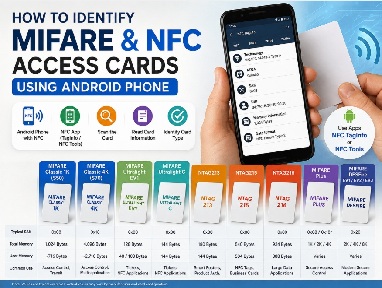
Using an NFC scanning application such as NFC TagInfo or NFC Tools, you can obtain useful information about many contactless cards, including the card technology, ATQA, SAK, UID, memory information and supported protocols.
NFC TagInfo by NXP is a free mobile tool that reads technical data, memory layouts, and NDEF messages from contactless RFID and NFC chips.
NFC Tools is a cross-platform software and mobile application designed to read, write, and program NFC (Near Field Communication) tags and chips.
This guide explains what these values mean, how to interpret a scan, and how to distinguish common card families such as MIFARE Classic, MIFARE Ultralight, MIFARE Plus, MIFARE DESFire and NTAG.
Important: Identifying an NFC card is not the same as copying or duplicating it. Secure access-control cards may use authentication, encryption, protected memory, application data or other security mechanisms that cannot simply be read with an Android phone.
1. What Do You Need?
For basic NFC card identification, you need only three things:
- An Android smartphone with NFC
- An NFC scanning application
- The card you want to identify
Popular NFC applications include NFC TagInfo and NFC Tools.
First, make sure NFC is enabled on your Android phone.
Open the NFC application and place the card against the NFC antenna area of the phone. The antenna position varies between phone models, so you may need to move the card slightly until it is detected.
2. What Can an NFC Scan Tell You?
An NFC scan can display a surprising amount of technical information.
For card identification, start with these fields:
1. Technology
This tells you what type of contactless technology the phone has detected.
You may see:
- MIFARE Classic
- MIFARE Ultralight
- MIFARE Plus
- MIFARE DESFire
- NTAG
- ISO/IEC 14443 Type A
- ISO/IEC 14443-4
The technology field is usually the best place to start.
2. ATQA
ATQA means Answer To Request, Type A.
It is a protocol-level response used during the initial communication between an ISO/IEC 14443 Type A reader and card.
ATQA can provide useful clues about the card, but it should be interpreted together with SAK and other information.
3. SAK
SAK means Select Acknowledge.
SAK is particularly useful because its bits provide information about the card's protocol capabilities and possible architecture.
However:
SAK is not a universal card model number.
The same or related SAK characteristics can occur with different products or configurations.
4. UID
The UID (Unique Identifier) is returned by the card during the anti-collision and selection process.
Depending on the card, the UID may be:
- 4 bytes
- 7 bytes
- 10 bytes
The UID can be useful when documenting or troubleshooting a system. However, do not automatically assume that the UID is the access credential. How an access-control system uses the card identifier depends on the system's design.
5. Memory
Memory capacity can help distinguish different cards within a family.
For example:
|
Card |
Total / Available Memory |
|
MIFARE Classic 1K |
1,024 bytes |
|
MIFARE Classic 4K |
4,096 bytes |
|
NTAG213 |
180 bytes total / 144 bytes user memory |
|
NTAG215 |
540 bytes total / 504 bytes user memory |
|
NTAG216 |
924 bytes total / 888 bytes user memory |
Memory is useful, but memory size alone should not be used to identify a card.
3. What Is MIFARE?
MIFARE is a family of contactless technologies and products associated with NXP Semiconductors.
MIFARE products are widely used in applications such as:
- Access control
- Public transportation
- Identification
- Ticketing
- Campus cards
- Contactless applications
- Multi-application credentials
💡 Quick Hint: Who Is Behind MIFARE?
MIFARE is an NXP technology family.
When you see names such as MIFARE Classic, MIFARE Plus, MIFARE Ultralight and MIFARE DESFire, you are generally looking at products within the MIFARE portfolio associated with NXP Semiconductors.
However, MIFARE is not one single card type.
Different MIFARE families have different:
- Memory capacities
- Communication protocols
- Security mechanisms
- Data structures
- Applications
Major MIFARE families include:
- MIFARE Classic
- MIFARE Mini
- MIFARE Ultralight
- MIFARE Plus
- MIFARE DESFire
There are also NTAG products in the NXP NFC portfolio. NTAG is a separate product family and should not be confused with MIFARE Classic simply because both are contactless/NFC technologies.
Remember
MIFARE is a family of contactless technologies - not one specific card model.
This is one of the most important concepts to understand before trying to identify an access card.
4. MIFARE Classic 1K - S50
The MIFARE Classic 1K is one of the best-known legacy MIFARE cards.
It is also commonly referred to as:
MIFARE S50
It has:
1,024 bytes of memory
The memory is organized into sectors and blocks, with authentication keys controlling access to protected areas.
A commonly encountered identification combination is:
- Technology: MIFARE Classic
- SAK: 0x08
- Memory: 1 KB
This combination strongly points toward a MIFARE Classic 1K card.
Common applications
Historically, MIFARE Classic 1K has been used in:
- Older access-control systems
- Employee cards
- Hotel cards
- Transportation
- Membership systems
- Identification systems
5. MIFARE Classic 4K - S70
The larger member of the Classic family is:
MIFARE Classic 4K
It is also known as:
MIFARE S70
It provides:
4,096 bytes of memory
A commonly encountered combination is:
- Technology: MIFARE Classic
- SAK: 0x18
- Memory: approximately 4 KB
This points toward MIFARE Classic 4K.
The larger memory capacity allows more sectors and data than the 1K version.
6. MIFARE Classic Mini
The MIFARE Classic Mini is a smaller-memory member of the Classic family.
It has substantially less memory than the Classic 1K and Classic 4K.
The Mini was intended for applications where only a relatively small amount of data was required.
Identification tip
Do not identify a card as Classic Mini based only on its memory size.
Always look at the technology, ATQA, SAK and other scanner information before making a final identification.
7. MIFARE Ultralight Family
MIFARE Ultralight is a separate family from MIFARE Classic.
It is designed for applications where only a small amount of memory is required.
Typical applications include:
- Tickets
- Transit applications
- Event passes
- Disposable credentials
- NFC applications
Common versions include:
- MIFARE Ultralight
- MIFARE Ultralight C
- MIFARE Ultralight EV1
Different versions provide different memory sizes and security features.
8. MIFARE Ultralight C
MIFARE Ultralight C provides approximately:
144 bytes of user memory
It also provides 3DES-based authentication.
This gives it additional security capabilities compared with basic Ultralight products.
9. MIFARE Ultralight EV1
MIFARE Ultralight EV1 is available in different memory configurations.
Common versions provide approximately:
- 48 bytes of user memory
- 108 bytes of user memory
Depending on the version, features can include password protection and other security/originality-related functions.
These cards are commonly associated with ticketing and NFC applications.
10. NTAG213, NTAG215 and NTAG216
NTAG is another important NFC product family.
Three commonly encountered models are:
|
Model |
Total Memory |
User Memory |
|
NTAG213 |
180 bytes |
144 bytes |
|
NTAG215 |
540 bytes |
504 bytes |
|
NTAG216 |
924 bytes |
888 bytes |
These products are commonly used for:
- NFC business cards
- Smart posters
- Product information
- Marketing
- Digital links
- NFC tags
- Product-related authentication applications
Easy way to remember
213 → 144 bytes user memory
215 → 504 bytes user memory
216 → 888 bytes user memory
A card being NFC-compatible does not mean it is interchangeable with MIFARE Classic.
11. MIFARE Plus
MIFARE Plus was designed as a more secure evolution of the MIFARE Classic concept.
It is available in different memory configurations, including:
- 1K
- 2K
- 4K
One of its important characteristics is its support for migration toward stronger security.
MIFARE Plus can therefore be encountered in:
- Access control
- Transportation
- Secure identification
- Legacy-system migration
Because MIFARE Plus can have memory capacities similar to MIFARE Classic, memory size alone cannot reliably identify the technology.
12. MIFARE DESFire
MIFARE DESFire is a much more advanced family of secure contactless products.
Common generations include:
- DESFire EV1
- DESFire EV2
- DESFire EV3
Depending on the generation and configuration, DESFire supports advanced cryptographic security and a multi-application architecture.
Typical applications include:
- Modern access control
- Campus cards
- Transportation
- Secure identification
- Multi-application credentials
- Secure payment-related applications
Important distinction
DESFire should not be considered simply a "larger MIFARE Classic."
Its:
- Architecture
- Authentication
- Communication
- Security
- Data organization
are fundamentally different.
13. Understanding SAK
Now that we understand the major card families, we can look more closely at SAK.
SAK stands for:
Select Acknowledge
It is returned by the card during the selection process and contains protocol-related information.
NFC applications normally display SAK in hexadecimal.
For example:
SAK: 0x08
or:
SAK: 0x18
SAK is useful because certain values are commonly associated with particular card technologies.
However, the most important rule is:
SAK is a clue - not a complete card identification.
A card should be identified using several pieces of information together.
14. MIFARE SAK Reference Chart
The following chart can be used as a quick reference when interpreting an NFC scan.
|
SAK |
Binary |
Common Interpretation |
Important Note |
|
0x00 |
0000 0000 |
MIFARE Ultralight / Ultralight C / Ultralight EV1 / NTAG family |
ISO/IEC 14443-3 Type A |
|
0x04 |
0000 0100 |
UID not complete |
Cascade level required |
|
0x08 |
0000 1000 |
MIFARE Classic 1K |
Also possible in some compatible configurations |
|
0x09 |
0000 1001 |
MIFARE Mini |
Classic-family technology |
|
0x10 |
0001 0000 |
MIFARE Plus-related configuration |
Interpret with other card information |
|
0x11 |
0001 0001 |
MIFARE Plus-related configuration |
Interpret with other card information |
|
0x18 |
0001 1000 |
MIFARE Classic 4K |
Also possible in some compatible configurations |
|
0x20 |
0010 0000 |
ISO/IEC 14443-4 compliant card |
Commonly encountered with DESFire and certain MIFARE Plus configurations |
|
0x24 |
0010 0100 |
UID not complete + ISO/IEC 14443-4 indication |
Cascade level required |
|
0x28 |
0010 1000 |
Classic 1K characteristics + ISO/IEC 14443-4 |
May represent combined/emulated implementations |
|
0x38 |
0011 1000 |
Classic 4K characteristics + ISO/IEC 14443-4 |
May represent combined/emulated implementations |
⚠️ Important SAK Warning
Do not use this table as a simple:
SAK = exact chip model
lookup.
SAK contains capability and protocol information, and different card implementations can produce related SAK values.
For reliable identification, compare:
Technology + ATQA + SAK + UID + Memory + Manufacturer/Product Information
The complete scan provides much more information than SAK alone.
15. Why Is SAK Written in Hexadecimal?
NFC applications commonly display SAK in hexadecimal because it is a convenient way of representing binary protocol values.
For example:
Hexadecimal
0x08
Binary
0000 1000
Decimal
8
Another example:
Hexadecimal
0x18
Binary
0001 1000
Decimal
24
Hexadecimal is commonly used in technical documentation because it represents groups of binary bits in a compact format.
16. Understanding the Cascade Bit
Some SAK values relate to the UID-selection process.
For example:
- 0x04
- 0x24
can indicate that the UID is not yet complete and that another cascade level is required.
This is related to the way longer UIDs are selected during the ISO/IEC 14443 anti-collision and selection process.
A 7-byte or 10-byte UID can involve multiple cascade levels.
Therefore, seeing a cascade indication does not by itself identify the exact MIFARE model. It is primarily information about the card-selection process.
17. SAK vs. ATQA - What's the Difference?
Both values can be useful when identifying a card, but they are not the same thing.
ATQA
Think of ATQA as information provided during the initial request/response stage.
SAK
Think of SAK as information provided during the card selection stage.
Together, ATQA and SAK provide more information than either value alone.
Simple rule
ATQA + SAK is better than SAK alone.
And:
Technology + ATQA + SAK + UID + Memory is better still.
18. Why SAK Alone Is Not Enough
A common beginner mistake is:
"SAK 0x08 means I know exactly what the card is."
Not necessarily.
Another common assumption is:
"The card has 1 KB, so it must be MIFARE Classic 1K."
Again, not necessarily.
Different products can have similar characteristics, and some cards support or emulate protocol characteristics associated with other technologies.
Therefore, the safest identification method is to consider multiple parameters.
Recommended identification sequence
Technology → ATQA → SAK → UID → Memory → Manufacturer/Product Information
19. Practical Card Identification Examples
Let's see how this works in practice.
Example 1 - MIFARE Classic 1K
The scanner reports:
Technology: MIFARE Classic
SAK: 0x08
Memory: 1,024 bytes
Likely identification:
MIFARE Classic 1K / S50
The combination of technology, SAK and memory strongly supports this identification.
Example 2 - MIFARE Classic 4K
The scanner reports:
Technology: MIFARE Classic
SAK: 0x18
Memory: 4,096 bytes
Likely identification:
MIFARE Classic 4K / S70
Again, the combination of the three values provides a strong indication.
Example 3 - NTAG213
The scanner reports:
Technology: NTAG
Total memory: 180 bytes
User memory: 144 bytes
Likely identification:
NTAG213
Example 4 - NTAG215
The scanner reports:
Technology: NTAG
Total memory: 540 bytes
User memory: 504 bytes
Likely identification:
NTAG215
Example 5 - DESFire
The scanner reports:
Technology: MIFARE DESFire
SAK: 0x20
Likely identification:
MIFARE DESFire family
However, do not determine the exact generation—EV1, EV2 or EV3—from SAK alone.
Additional card information is required.
20. MIFARE Card Comparison
|
Card Type |
Approx. Memory |
Typical Security |
Common Applications |
|
MIFARE Classic Mini |
320 bytes |
Legacy authentication |
Small legacy applications |
|
MIFARE Classic 1K / S50 |
1 KB |
Crypto1-based |
Legacy access control |
|
MIFARE Classic 4K / S70 |
4 KB |
Crypto1-based |
Access control, transportation |
|
MIFARE Ultralight |
Small |
Basic/limited |
Tickets, NFC |
|
MIFARE Ultralight C |
144 bytes user |
3DES authentication |
Tickets, NFC |
|
MIFARE Ultralight EV1 |
48/108 bytes user |
Enhanced features |
Tickets, NFC |
|
MIFARE Plus |
1K/2K/4K |
Improved security options |
Secure access, migration |
|
DESFire EV1 |
2K/4K/8K |
Advanced cryptography |
Secure access |
|
DESFire EV2 |
2K/4K/8K |
Advanced cryptography |
Secure multi-application |
|
DESFire EV3 |
2K/4K/8K |
Modern security |
Modern secure systems |
|
NTAG213 |
180 bytes |
NFC tag security features |
Smart tags |
|
NTAG215 |
540 bytes |
NFC tag security features |
NFC applications |
|
NTAG216 |
924 bytes |
NFC tag security features |
Larger NFC data |
21. Does 13.56 MHz Mean MIFARE?
No.
Many MIFARE and NFC products operate at:
13.56 MHz
But frequency alone does not identify the card.
Other contactless technologies also operate in the 13.56 MHz range.
Therefore:
13.56 MHz ≠ MIFARE Classic
and:
NFC ≠ MIFARE Classic
The actual technology and protocol are what matter.
22. Can an Android Phone Read Every Access Card?
No.
An Android phone with NFC can be useful for many 13.56 MHz NFC/contactless cards, but it cannot automatically read every access-control technology.
Access systems may use:
- 125 kHz proximity cards
- 13.56 MHz smart cards
- MIFARE technologies
- DESFire
- Other proprietary technologies
A typical smartphone NFC system is designed primarily for 13.56 MHz NFC/contactless communication.
Therefore, if your access card is a low-frequency 125 kHz proximity card, a normal Android NFC application will generally not detect it.
This is an important point when troubleshooting an unknown card.
23. What If the Phone Does Not Detect the Card?
If your phone does not detect the card, try the following.
Check NFC
Make sure NFC is enabled.
Try a different position
Move the card around the back of the phone. NFC antenna locations vary between models.
Remove the phone case
Thick or metallic cases can interfere with NFC communication.
Try another NFC application
Different applications may display different levels of technical information.
Check the card frequency
If the card is a 125 kHz proximity card, the phone's NFC hardware will generally not detect it.
Consider security and compatibility
Some secure cards may expose only limited information to a general-purpose NFC application.
24. Identifying the Card vs. Identifying the Access-Control System
This is one of the most important concepts for access-control technicians.
Suppose your phone identifies a card as:
MIFARE Classic 1K
That tells you about the card technology.
It does not necessarily tell you how the access-control system uses that card.
The system could rely on:
- UID-based identification
- Data stored in specific sectors
- Authentication keys
- Proprietary card formats
- Encrypted credentials
- Multiple applications
- A backend database
Therefore:
Knowing the card model does not automatically tell you how the card is programmed or whether another card will work.
25. Choosing a Replacement Card
When replacing an access card, do not simply search for:
"13.56 MHz MIFARE card"
That description is too broad.
Instead, determine as much as possible about the original system.
Check:
- Frequency
- Card technology
- MIFARE family
- Memory capacity
- UID configuration
- Security/authentication
- Reader compatibility
- Access-control software requirements
- Whether cards require enrollment or programming
For example, a MIFARE Classic 1K, a MIFARE Plus 1K, and another 13.56 MHz contactless card are not necessarily interchangeable.
26. Quick Identification Cheat Sheet
|
Scanner Result |
Likely Identification |
|
MIFARE Classic + 0x08 + approximately 1 KB |
MIFARE Classic 1K / S50 |
|
MIFARE Classic + 0x18 + approximately 4 KB |
MIFARE Classic 4K / S70 |
|
MIFARE Mini indication + matching characteristics |
MIFARE Classic Mini |
|
MIFARE Ultralight indication |
MIFARE Ultralight family |
|
Ultralight C + 144-byte user memory |
MIFARE Ultralight C |
|
NTAG + 144-byte user memory |
NTAG213 |
|
NTAG + 504-byte user memory |
NTAG215 |
|
NTAG + 888-byte user memory |
NTAG216 |
|
MIFARE Plus indication |
MIFARE Plus family |
|
DESFire indication + ISO/IEC 14443-4 |
MIFARE DESFire family |
Remember that these are likely identifications, not guaranteed chip-level identifications based on one scan value.
27. The Golden Rule of NFC Card Identification
When identifying an unknown access card:
Never rely on one number alone.
Instead, collect as much information as the scanner provides:
Technology
↓
ATQA
↓
SAK
↓
UID
↓
Memory
↓
Manufacturer / Product Information
The more information you have, the more confidently you can identify the card family.
The SAK is an excellent starting point, but it should be treated as a protocol and capability indicator, rather than a guaranteed chip model number.
28. Security & Responsible Testing
NFC cards are used for security-sensitive applications such as:
- Building access
- Employee identification
- Transportation
- Membership systems
- Secure credentials
Only test cards and systems that you are authorized to examine.
There is an important difference between identifying a card and attempting to bypass its security.
For legitimate access-control work, use NFC scanning to determine:
- Card technology
- Compatibility
- Replacement requirements
- Reader requirements
- System configuration
Card enrollment, programming and credential management should be performed through the authorized access-control system.
29. Training Summary
An NFC-enabled Android phone can be a useful diagnostic tool for identifying many contactless cards.
When scanning an unknown card, start with:
1. Technology
2. ATQA
3. SAK
4. UID
5. Memory
6. Manufacturer/Product Information
Some useful examples are:
MIFARE Classic + SAK 0x08 + 1 KB
→ likely MIFARE Classic 1K / S50
MIFARE Classic + SAK 0x18 + 4 KB
→ likely MIFARE Classic 4K / S70
NTAG + 144-byte user memory
→ likely NTAG213
NTAG + 504-byte user memory
→ likely NTAG215
NTAG + 888-byte user memory
→ likely NTAG216
DESFire + SAK 0x20
→ likely MIFARE DESFire family, with additional information required to determine the exact generation.
The most important lesson:
SAK tells you something about the card's protocol and capabilities, but the complete NFC scan tells you much more.
Once you understand this principle, identifying an unknown NFC access card becomes much easier and more reliable.
Copyright & Trademark Disclaimer
© 2026 GSQ8.com. All rights reserved.
All product names, trademarks, logos, brand names and company names mentioned or displayed in this article are the property of their respective owners. MIFARE, MIFARE Classic, MIFARE DESFire, MIFARE Plus, MIFARE Ultralight, NTAG, and other referenced trademarks belong to their respective trademark owners.
GSQ8.com is not affiliated with, sponsored by, or endorsed by the manufacturers or trademark owners mentioned in this article unless explicitly stated.
This article is provided for general educational and informational purposes only. Product specifications, compatibility, memory capacities, security features and technical characteristics may vary depending on the specific product, manufacturer, version or configuration. Always verify the manufacturer's official specifications before purchasing or deploying products.
The use of trademarks and brand names in this article is solely for identification, comparison and educational purposes and does not imply ownership or endorsement by GSQ8.com.