Barcode Printer Sensors Explained
Barcode Printer Sensors Explained
One of the most misunderstood parts of a barcode printer is the media sensor. Many users believe the printer detects the entire label, but in reality, it only reads a very small area directly beneath or above the sensor.
Understanding how barcode printer sensors work can help you solve common problems such as:
- Labels skipping
- Printing between labels
- Continuous feeding
- "Media Out" errors
- Incorrect label positioning
- Calibration failures
In this tutorial, you'll learn how barcode printer sensors work, the difference between gap and black mark sensing, and how transmissive and reflective technologies detect labels.
What Is a Barcode Printer Sensor?
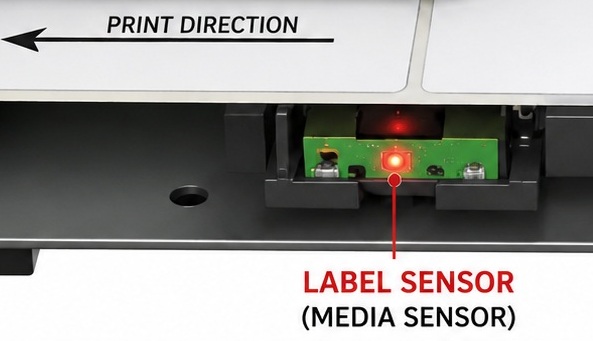
A barcode printer sensor is an electronic device that detects the beginning and end of each label so the printer knows exactly where to start and stop printing.
Without a properly functioning sensor, the printer cannot accurately position the print on each label.
The sensor reads only a narrow path across the media-not the entire width of the label roll.
Why Does a Barcode Printer Need a Sensor?
The printer must know:
- Where one label ends
- Where the next label begins
- The exact label length
- When to stop printing
- When to feed the next label
This information allows the printer to print one label at a time with accurate positioning.
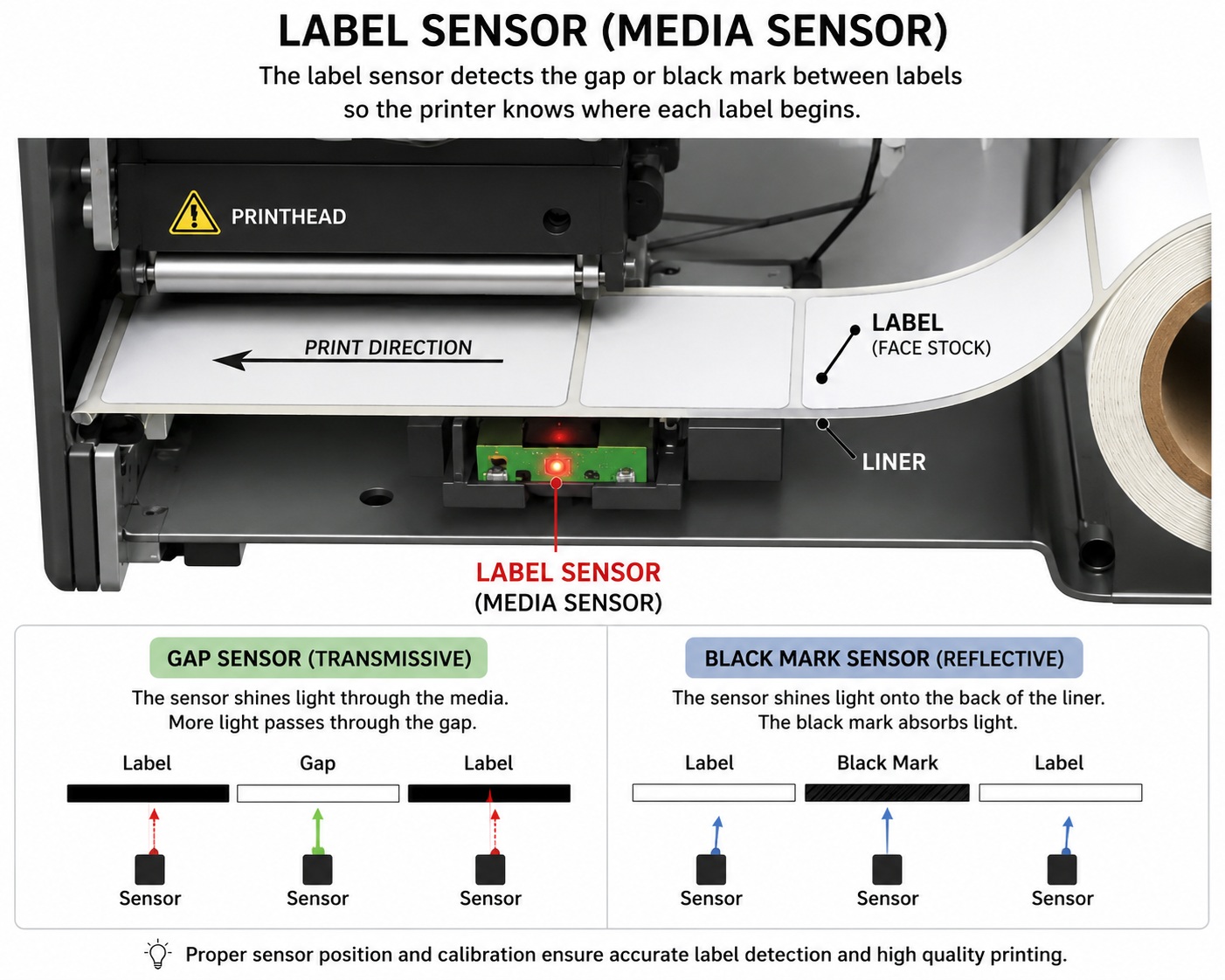
Types of Barcode Printer Sensors
There are two primary sensing methods used in thermal barcode printers:
1. Gap Sensor (Transmissive Sensor)
The Gap Sensor, also known as a Transmissive Sensor, is the most common label detection method.
It works by shining a light through the label liner.
How It Works
- An LED shines light upward through the label media.
- A receiver measures how much light reaches it.
- When the light passes through the gap between labels, more light reaches the receiver.
- The printer recognizes this increase in light as the start of the next label.
Because light passes through the media, this method is called transmissive sensing.
Best Used For
- Die-cut labels
- Shipping labels
- Product labels
- Retail labels
- Barcode labels
- Most standard paper labels
Advantages
- Very accurate
- Works with most label rolls
- Fast calibration
- Widely supported
Limitations
- Cannot detect labels without a physical gap.
- Thick or opaque media may reduce sensing accuracy.
2. Black Mark Sensor (Reflective Sensor)
Some labels do not have a physical gap.
Instead, they use a black mark printed on the back of the liner.
These labels require a Black Mark Sensor, also called a Reflective Sensor.
How It Works
Instead of shining light through the label:
- The sensor shines light onto the back of the liner.
- White liner reflects light.
- Black marks absorb light.
- The printer detects the change in reflection.
This method is called reflective sensing.
Best Used For
- Continuous labels
- Wristbands
- Tickets
- Tags
- Medical labels
- Special media
Advantages
- Works without label gaps.
- Excellent for unusual label shapes.
- Reliable on continuous media with registration marks.
Limitations
- Requires correctly printed black marks.
- Dirt or scratches may affect detection.
Transmissive vs Reflective Sensors
Many people think these are different sensor types.
Actually:
- Gap Sensor = Transmissive Technology
- Black Mark Sensor = Reflective Technology
The names describe how the light is detected, not necessarily different pieces of hardware.
|
Feature |
Transmissive Sensor |
Reflective Sensor |
|
Reads Through Media |
✔ Yes |
✘ No |
|
Reads Reflected Light |
✘ No |
✔ Yes |
|
Detects Label Gap |
✔ Yes |
✘ No |
|
Detects Black Mark |
✘ No |
✔ Yes |
|
Best For |
Die-cut labels |
Continuous media with black marks |
Fixed vs Movable Sensors
Barcode printers generally use one of two sensor designs.
Fixed Center Sensor
Many desktop printers have a sensor permanently located in the center of the printer.
The label gap or black mark must pass directly over this location.
Examples include many compact desktop barcode printers.
Advantages
- Simple
- Low maintenance
- Easy calibration
Limitation
The label design must place the gap or black mark along the sensor path.
Movable Sensor
Industrial barcode printers often allow the sensor to slide left or right.
This allows detection of:
- Offset gaps
- Side notches
- Black marks in different positions
- Unusual label layouts
Advantages
- Supports custom labels
- Greater flexibility
- Better for industrial applications
How Barcode Printers Detect Labels
The printer does not inspect the entire width of the label roll.
Instead, it monitors only the narrow path directly beneath the sensor.
This is why sensor position is extremely important.
If the gap or black mark is not aligned with the sensor, the printer may:
- Skip labels
- Print across two labels
- Continuously feed labels
- Report "No Media"
Why Sensor Calibration Is Important
Calibration teaches the printer:
- Label length
- Gap position
- Black mark position
- Light and dark reference levels
Whenever you change:
- Label size
- Label material
- Label supplier
- Black mark design
- Sensor position
You should perform a media calibration.
Common Sensor Problems
Labels Skip
Possible causes:
- Sensor not aligned
- Incorrect media type selected
- Calibration required
Continuous Feeding
Possible causes:
- Gap not detected
- Wrong sensor mode
- Dirty sensor
- Incorrect label settings
Printing Between Labels
Possible causes:
- Incorrect label length
- Failed calibration
- Sensor positioned incorrectly
Media Out Error
Possible causes:
- Dirty sensor
- Damaged sensor
- Wrong media installed
- Gap not passing over sensor
Cleaning the Sensor
Dust, adhesive, and paper particles can interfere with sensor operation.
To clean the sensor:
- Turn off the printer.
- Open the media compartment.
- Locate the sensor.
- Use compressed air to remove loose debris.
- Gently clean with a lint-free swab lightly moistened with isopropyl alcohol.
- Allow it to dry before loading labels again.
Avoid using sharp tools that could damage the sensor.
Choosing the Right Sensor
Choose Gap (Transmissive) Sensing when using:
- Standard die-cut labels
- Shipping labels
- Product labels
- Retail barcode labels
- Inventory labels
Choose Black Mark (Reflective) Sensing when using:
- Continuous labels
- Tickets
- Wristbands
- Special-shaped labels
- Media with printed registration marks
Ribbon Sensor
Only Thermal Transfer printers use a ribbon sensor.
The ribbon sensor checks whether a thermal transfer ribbon is installed and whether it is moving correctly during printing.
Without this sensor, the printer may:
- Print blank labels
- Stop printing
- Display a Ribbon Out error
- Report Ribbon Fault
How It Works
Different manufacturers use different technologies.
The sensor may detect:
- Ribbon movement
- Ribbon transparency
- Ribbon end
- Ribbon rotation
Some printers automatically detect whether Direct Thermal or Thermal Transfer mode is being used.
Common Problems
- Ribbon Out error
- Wrong ribbon type
- Ribbon wrinkle
- Ribbon not threaded correctly
- Dirty ribbon sensor
Ribbon End Sensor
Many industrial printers include a sensor that detects when the ribbon roll has almost finished.
When the ribbon reaches the end:
- Printing stops
- The printer displays a Ribbon Out message
- The operator installs a new ribbon
This prevents labels from being printed without ink.
Printhead Open (Door) Sensor
Another important sensor is the Printhead Open Sensor, often called the Door Sensor.
Its job is simple:
The printer must know whether the printhead assembly is locked.
If the printhead is open:
- Printing is disabled
- Calibration cannot begin
- The printer displays Head Open or Cover Open
This prevents label damage and protects the printhead.
Printhead Temperature Sensor
Every thermal printhead contains thousands of tiny heating elements.
If the printhead becomes too hot:
- Print quality decreases
- The printhead may be damaged
A built-in temperature sensor continuously monitors the printhead.
If necessary, the printer:
- Slows down
- Pauses briefly
- Reduces heat
- Displays a temperature warning
This greatly extends printhead life.
Printhead Pressure Detection
Although not always an electronic sensor, many industrial printers monitor or allow adjustment of printhead pressure.
Uneven pressure can cause:
- Light printing on one side
- Missing barcode lines
- Ribbon wrinkles
- Poor barcode quality
Proper pressure adjustment is essential when printing wide labels.
Label Taken Sensor (Peel Sensor)
Printers equipped with a peel-off dispenser often include a Label Taken Sensor.
After printing:
- The printer peels the label.
- The sensor waits until the user removes it.
- Only then does the printer print the next label.
This prevents labels from piling up.
Cutter Sensor
Printers fitted with an automatic cutter often include a cutter sensor.
It detects:
- Cutter home position
- Successful cutting
- Cutter jams
If the cutter becomes blocked:
- Printing stops.
- A Cutter Error appears.
Media End Sensor
Some industrial printers can detect when the label roll has finished.
When no labels remain:
- Printing stops.
- The printer displays Media Out.
- The operator loads a new roll.
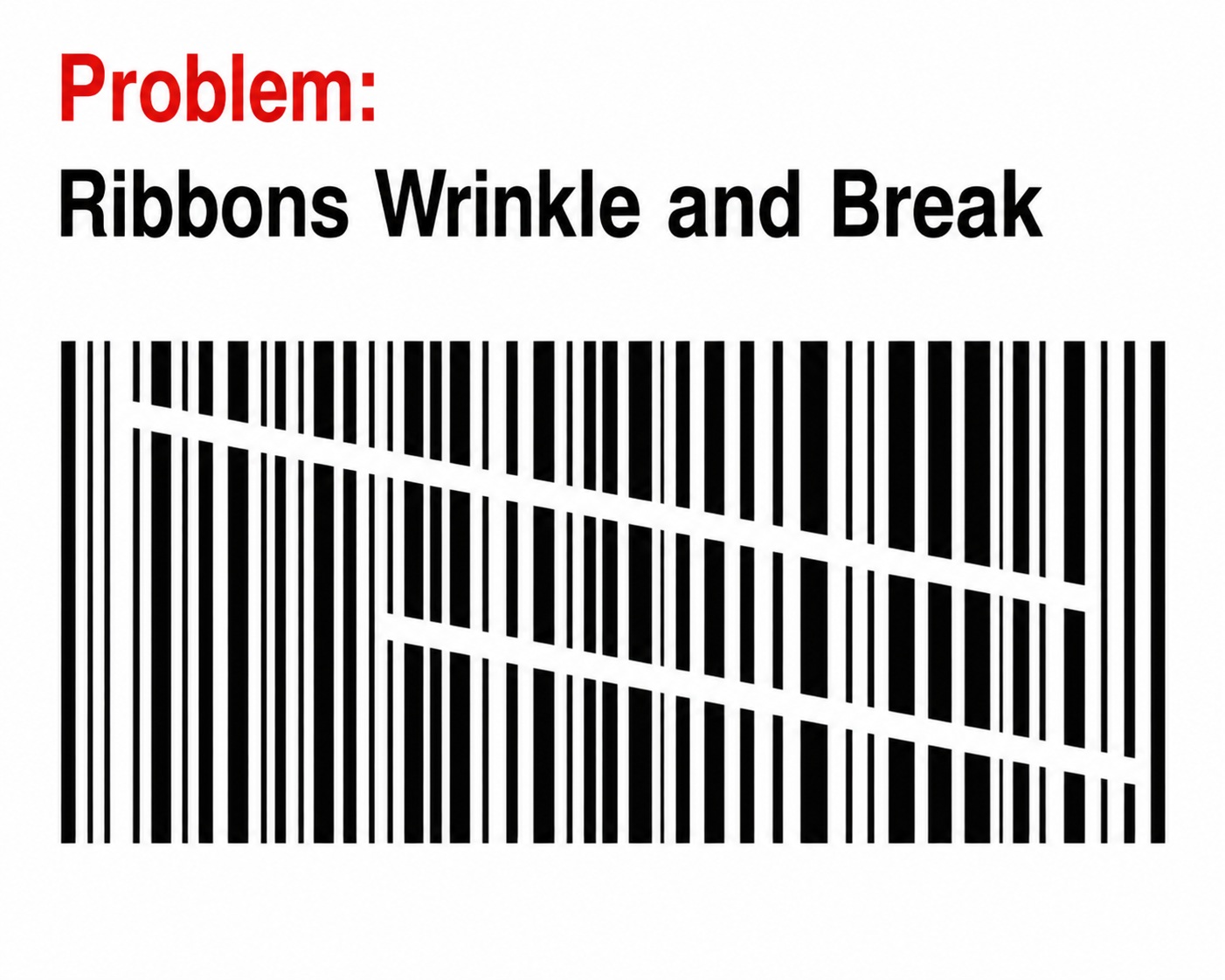
Ribbon Wrinkle Detection
High-end industrial printers may detect ribbon wrinkles.
Ribbon wrinkles can cause:
- Missing print
- White streaks
- Poor barcode quality
- Uneven darkness
The printer may stop printing to prevent wasted labels.
Encoder Sensor
Some premium barcode printers use an encoder sensor.
This monitors the exact movement of the media.
Benefits include:
- More accurate positioning
- Better print registration
- Consistent print length
- Higher precision at fast print speeds
This feature is mainly found in industrial barcode printers.
RFID Sensor (RFID Models Only)
RFID barcode printers contain an additional RFID sensor.
Its purpose is to:
- Detect RFID tags
- Position the tag correctly
- Verify programming
- Confirm successful encoding
Without this sensor, RFID encoding would be unreliable.
Sensor Summary Table
|
Sensor |
Function |
|
Gap Sensor |
Detects the gap between labels |
|
Black Mark Sensor |
Detects black registration marks |
|
Ribbon Sensor |
Detects ribbon presence and movement |
|
Ribbon End Sensor |
Detects when ribbon is finished |
|
Door / Printhead Open Sensor |
Prevents printing with the head open |
|
Printhead Temperature Sensor |
Prevents overheating |
|
Peel Sensor |
Waits until the label is removed |
|
Cutter Sensor |
Monitors cutter operation |
|
Media End Sensor |
Detects when labels run out |
|
Encoder Sensor |
Measures media movement accurately |
|
RFID Sensor |
Detects and verifies RFID tags |
Sensors You Can Actually See Inside a Barcode Printer:
- Gap Sensor
- Black Mark Sensor
- Ribbon Sensor
- Ribbon Path
- Printhead
- Platen Roller
- Peel Sensor
- Cutter
- Door Sensor
Frequently Asked Questions
Can one printer support both sensing methods?
Yes. Many modern barcode printers support both transmissive and reflective sensing. The sensing mode can usually be selected in the printer driver or control panel.
Why does my printer keep skipping labels?
This is often caused by incorrect sensor settings, misalignment, or the need for media calibration.
Does the sensor read the whole label?
No. A barcode printer sensor only reads a narrow path across the media. The gap or black mark must pass directly over the sensor.
Do all barcode printers have movable sensors?
No. Entry-level desktop printers often have fixed center sensors, while many industrial printers provide adjustable sensors for greater flexibility.
Conclusion
Barcode printer sensors are essential for accurate label positioning and reliable printing. Understanding the difference between Gap Sensors (Transmissive Sensors) and Black Mark Sensors (Reflective Sensors) helps you choose the correct media, perform proper calibration, and troubleshoot common printing issues.
Whether you are printing shipping labels, retail barcodes, industrial tags, or healthcare labels, correctly aligning and calibrating the sensor ensures every label is printed accurately and consistently.