Barcode Printer Printhead Explained: How It Works, DPI, Lifespan & Why It's Considered a Consumable
Introduction
The thermal printhead is the heart of every barcode label printer. Every barcode, QR code, shipping label, product label, asset tag, and price sticker produced by your printer is created by this single precision component.
Unlike inkjet printers that spray liquid ink or laser printers that fuse toner onto paper, thermal barcode printers rely entirely on controlled heat. The printhead contains hundreds or even thousands of microscopic heating elements that rapidly switch on and off to create the printed image with exceptional precision.
Although the printhead is engineered to operate reliably for millions of heating cycles, it is also the component that experiences the greatest amount of mechanical and thermal stress. Every label printed contributes a tiny amount of wear, making the printhead one of the few parts inside the printer that will eventually require replacement.
For this reason, manufacturers such as Zebra, Honeywell, TSC, Toshiba Tec, SATO, Citizen, GoDEX, BIXOLON, Brother, and many others classify the thermal printhead as a consumable item rather than a permanent component.
Understanding how a printhead works is essential for anyone who operates a barcode printer. It helps you select the correct print resolution, improve print quality, extend the life of the printhead, reduce maintenance costs, and avoid unnecessary downtime.
In this guide, you'll learn exactly how a thermal printhead works, what DPI means, why printheads wear out, how to maintain them correctly, and the best practices for maximizing their service life.
What Is a Thermal Printhead?
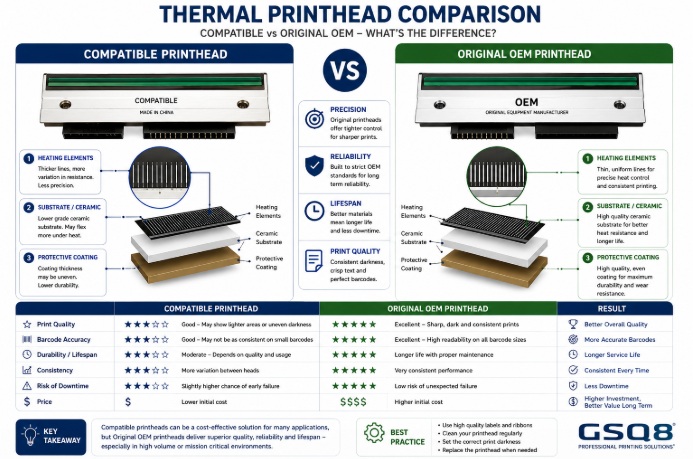
A thermal printhead is a precision electronic device that converts electrical energy into heat. It is responsible for creating every printed image produced by a thermal barcode printer.
Rather than using ink cartridges or toner, the printhead generates tiny bursts of heat at precisely controlled locations across its surface. These bursts of heat either activate the coating on a Direct Thermal label or transfer ink from a Thermal Transfer ribbon onto the label.
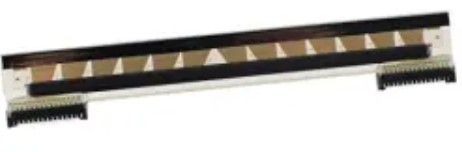
At first glance, a printhead appears to be a simple metal bar with a smooth ceramic strip. In reality, it is one of the most sophisticated components inside the printer.
Beneath the protective ceramic coating are:
-
Thousands of microscopic heating elements
-
Electronic driver circuits
-
Temperature sensors
-
Protective insulation layers
-
Precision electrical connections
Each heating element is only a fraction of a millimetre wide and acts as an individual printing pixel. Together, these elements form a straight line across the width of the printer.
When activated in the correct sequence, they produce crisp text, barcodes, graphics, logos, and QR codes with remarkable accuracy.
Without the printhead, a thermal printer cannot print anything.
The Main Components of a Thermal Printhead
Although the internal construction varies slightly between manufacturers, most barcode printer printheads consist of the following parts:
Ceramic Protective Layer
The outer ceramic coating protects the delicate heating elements from friction caused by labels and ribbons.
It is extremely hard but gradually wears during normal printing.
Heating Elements (Heating Dots)
These microscopic resistive elements generate heat whenever electrical current passes through them.
Each element represents a single printable dot.
A 4-inch 203 DPI printhead contains approximately 832 individual heating elements, while a 300 DPI model contains around 1,248 elements, and a 600 DPI model contains nearly 2,496 elements across the same print width.
Driver Electronics
The driver circuitry controls which heating elements switch on and for how long.
This determines:
-
Print darkness
-
Barcode accuracy
-
Image quality
-
Text sharpness
Temperature Sensor
Most modern thermal printheads include a temperature sensor that continuously monitors operating temperature.
If the printhead becomes too hot, the printer may automatically reduce print speed or pause briefly to protect the heating elements.
Electrical Connector
A precision connector links the printhead to the printer's main circuit board, allowing data and electrical power to be transferred accurately.
How Does a Thermal Printhead Work?
Although thermal printing appears simple from the outside, thousands of operations occur every second inside the printer.
The process can be divided into five stages.
Step 1 – The Printer Receives Print Data
The printer first receives information from a computer, ERP system, POS terminal, barcode software, or another connected device.
This information may include:
-
Product names
-
Barcodes
-
QR Codes
-
Serial numbers
-
Batch numbers
-
Logos
-
Graphics
-
Variable data
Step 2 – The Printer Processes the Image
The printer converts the incoming image into a grid of tiny dots.
Every printable dot corresponds to one heating element on the printhead.
The printer's processor determines exactly which heating elements must activate and for precisely how long.
Step 3 – Heating Elements Activate
Electrical current is supplied only to the required heating elements.
Each element reaches operating temperature within milliseconds.
The elements that remain switched off produce no image.
This selective heating process allows the printer to create extremely detailed graphics and perfectly formed barcodes.
Step 4 – The Image Is Created
The method used depends on the printing technology.
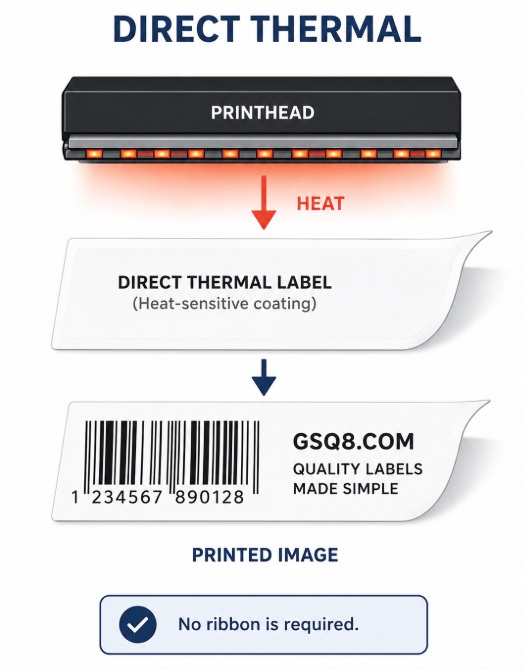
Direct Thermal Printing
The heated elements come into direct contact with the specially coated thermal label.
Where heat is applied, the label coating changes colour and forms the printed image.
No ribbon or ink is required.
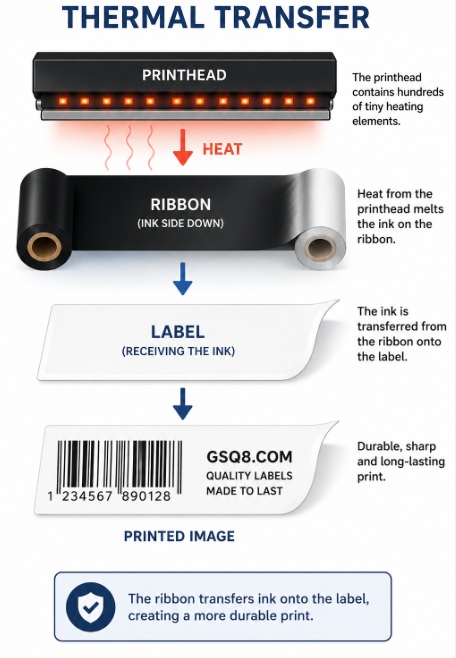
Thermal Transfer Printing
The printhead heats the thermal transfer ribbon instead of the label itself.
The ribbon's ink coating melts and transfers onto the label surface.
This produces highly durable images that are resistant to abrasion, sunlight, moisture, and many chemicals.
Step 5 – The Label Advances
The platen roller rotates continuously, moving the label beneath the printhead.
As the media advances, the printhead prints one horizontal line at a time.
Thousands of these lines combine to produce the complete barcode, text, or graphic.
The entire process happens in fractions of a second, allowing modern barcode printers to print several labels every second while maintaining excellent accuracy.
Direct Thermal vs Thermal Transfer Printing
One of the most common misconceptions is that Direct Thermal and Thermal Transfer printers use different printheads.
In reality, the printhead technology is almost identical.
The difference lies in how the heat is used.
Direct Thermal Printing
In Direct Thermal printing, the printhead applies heat directly to a chemically coated thermal label.
The heat activates the coating and creates the printed image.
Printing Process
Printhead → Heat → Direct Thermal Label → Printed Image
Since the label itself reacts to heat, no ribbon is required.
Advantages
-
Lower operating costs
-
Fewer consumables
-
Faster media loading
-
Simple maintenance
Best Applications
-
Shipping labels
-
Courier labels
-
Food packaging
-
Retail price labels
-
Short-term inventory labels
Thermal Transfer Printing
Thermal Transfer printing uses a ribbon positioned between the printhead and the label.
The printhead melts the ribbon's ink coating, transferring it permanently onto the label surface.
Printing Process
Printhead → Heat → Ribbon → Label → Printed Image
The ribbon acts as the ink source, producing a more durable image than Direct Thermal printing.
Advantages
-
Long-lasting print
-
Excellent barcode quality
-
Higher resistance to abrasion
-
Better resistance to sunlight
-
Suitable for synthetic labels
-
Greater chemical resistance
Best Applications
-
Asset labels
-
Warehouse labels
-
Industrial identification
-
Product labels
-
Laboratory labels
-
Outdoor applications
Understanding Printhead DPI
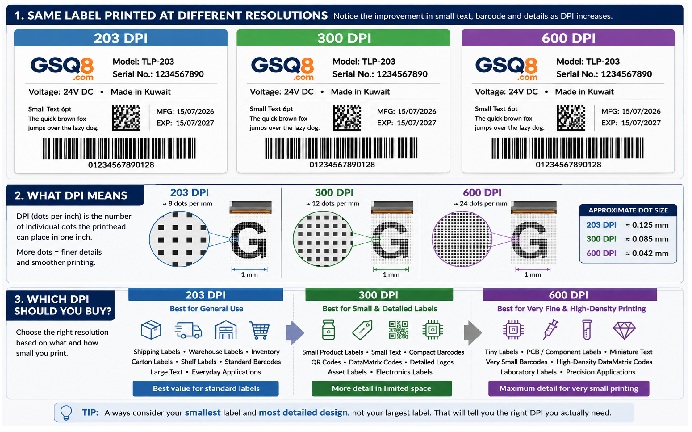
One of the first specifications you'll notice when purchasing a barcode printer is its DPI (Dots Per Inch) rating.
DPI indicates the number of individual heating elements arranged across one inch of the printhead.
The higher the DPI, the smaller each heating element becomes and the greater the level of detail the printer can produce.
Higher DPI is particularly important when printing:
-
Small barcodes
-
Tiny QR Codes
-
Fine text
-
Jewellery labels
-
Electronics labels
-
Laboratory labels
Common Printhead Resolutions
| Resolution | Dots per mm | Typical Applications |
|---|---|---|
| 203 DPI | 8 dots/mm | Shipping labels, warehouse labels, retail barcodes |
| 300 DPI | 12 dots/mm | Jewellery labels, healthcare labels, small text, QR Codes |
| 600 DPI | 24 dots/mm | Electronics, PCB labels, laboratory labels, micro barcodes |
Higher DPI does not necessarily produce stronger barcodes—it produces smaller and more detailed printing.
For most logistics, warehouse, shipping, and retail applications, 203 DPI is more than sufficient.
For very small labels or applications requiring tiny fonts and high-density barcodes, 300 DPI is generally recommended.
600 DPI is typically reserved for specialised industries such as electronics manufacturing, laboratory identification, and printed circuit board (PCB) labelling.
End of Part 1
The next section will cover:
-
Why Printheads Are Considered Consumable Items
-
Factors That Affect Printhead Lifespan
-
Why Manufacturers Offer Limited Printhead Warranty
Why Are Thermal Printheads Considered Consumable Items?
One of the most frequently asked questions by barcode printer owners is:
"Why is the printhead considered a consumable item when the rest of the printer is covered by warranty?"
The answer lies in how a thermal printhead operates.
Unlike the printer's frame, gears, motors, or electronic circuit boards, the printhead is continuously exposed to heat, friction, pressure, and mechanical wear every time a label is printed.
Every label that passes through the printer causes the printhead to perform thousands of heating cycles while simultaneously sliding across moving media. In Thermal Transfer printing, it also remains in constant contact with the ribbon.
Although the printhead is protected by an extremely hard ceramic coating, no protective surface lasts forever. After millions of labels and many kilometres of printed media, this coating gradually wears away. As the protective layer becomes thinner, the microscopic heating elements beneath it become increasingly vulnerable to scratches, contamination, overheating, and eventual failure.
For this reason, thermal printheads are classified as consumable components by virtually every barcode printer manufacturer.
They are designed to provide a long service life—not an unlimited one.
Think of It Like Your Car
A useful comparison is the braking system of a vehicle.
Components such as:
- Brake pads
- Tyres
- Clutch plates
are manufactured using durable materials and engineered to last for many thousands of kilometres. However, because they constantly experience friction, they eventually wear out and require replacement.
A barcode printer printhead works in much the same way.
It is built to withstand millions of heating cycles and continuous contact with labels and ribbons, but every printed label contributes a tiny amount of wear.
With proper maintenance, a printhead may last for years. Without proper care, its lifespan can be dramatically reduced.
Factors That Affect Printhead Lifespan
Although every printhead has a finite service life, how long it lasts depends largely on operating conditions rather than the printer itself.
The following factors have the greatest impact on printhead longevity.
1. Label Quality
The quality of the labels you use has a direct influence on printhead wear.
Premium labels are manufactured with smooth face materials, consistent coatings, and minimal paper dust.
Lower-quality labels often contain rougher surfaces and produce excessive paper fibres and dust.
As labels pass beneath the printhead, these particles act like extremely fine abrasive material.
Over time they gradually scratch the ceramic coating, increasing friction and accelerating wear.
Choosing high-quality labels is one of the simplest ways to extend printhead life.
2. Ribbon Quality
For Thermal Transfer printing, ribbon quality is equally important.
Premium ribbons are manufactured with smooth back coatings specifically designed to reduce friction between the ribbon and the printhead.
Low-quality ribbons may have:
- Uneven back coatings
- Rough surfaces
- Inconsistent ink layers
- Poor heat transfer characteristics
These issues force the printhead to generate more heat while increasing mechanical friction, both of which shorten its lifespan.
3. Print Darkness Settings
Many users believe increasing print darkness always produces better labels.
In reality, using higher darkness settings than necessary significantly increases printhead temperature.
Higher temperatures place greater stress on the heating elements and accelerate long-term wear.
The ideal setting is the lowest darkness level that still produces clear, high-contrast, and easily scannable barcodes.
4. Print Speed
Print speed and print darkness work together.
When printing at very high speeds, the printer has less time to transfer heat to the media.
To compensate, users often increase the darkness setting, causing the printhead to operate at higher temperatures.
For demanding applications, slightly reducing print speed often produces better print quality while reducing thermal stress.
5. Printhead Pressure
Correct printhead pressure is essential.
Too much pressure increases friction between the printhead and the media.
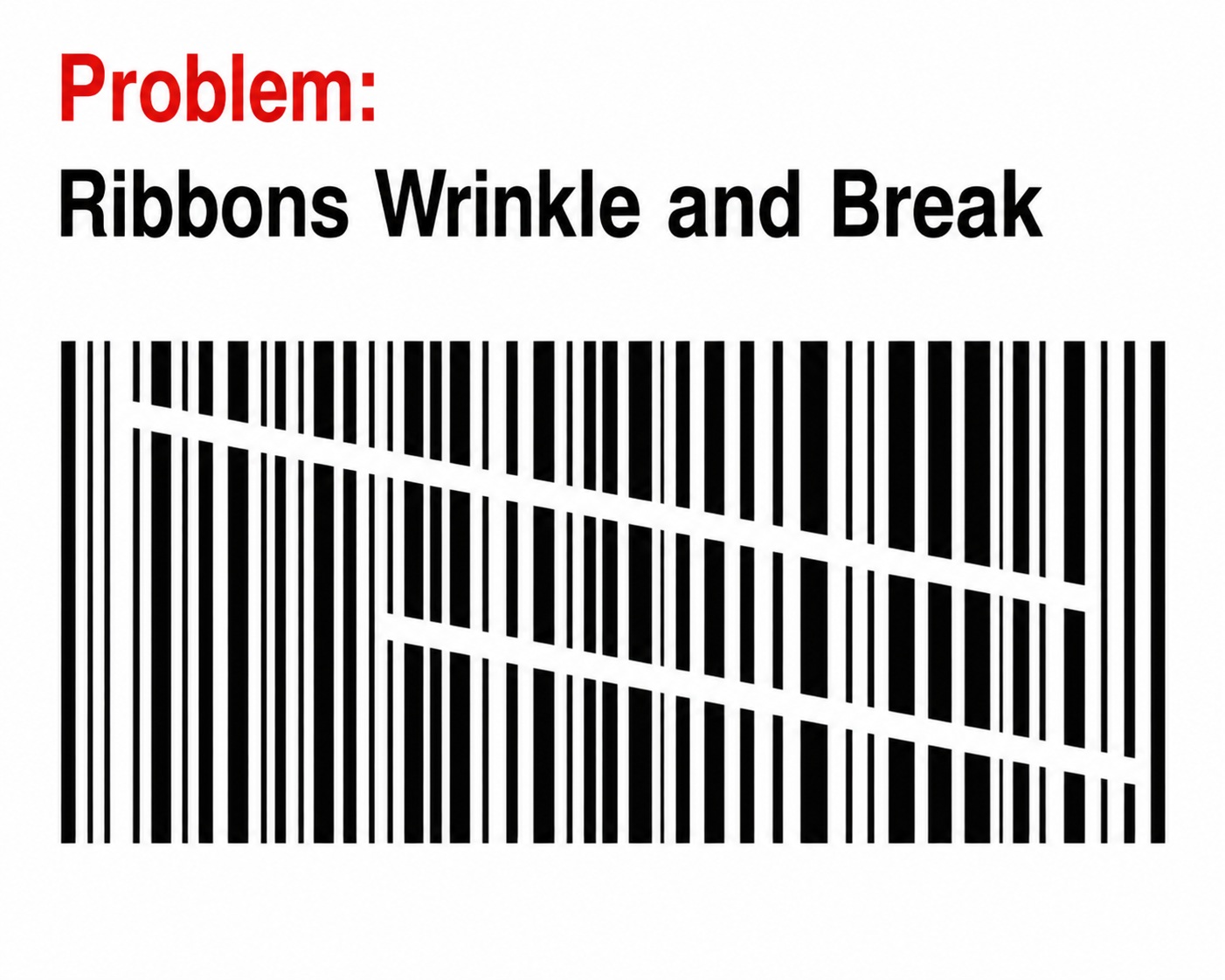
Too little pressure causes:
- Uneven print quality
- Light printing
- Incomplete barcodes
- Ribbon wrinkles
Industrial printers usually allow printhead pressure to be adjusted according to the media width.
Using only the required amount of pressure helps reduce unnecessary wear.
6. Dirty Platen Roller
The platen roller supports the label as it passes beneath the printhead.
If the roller becomes dirty, worn, or damaged, pressure is no longer distributed evenly.
Some heating elements work harder than others, creating localized overheating and uneven wear.
Cleaning or replacing a worn platen roller is just as important as cleaning the printhead itself.
7. Dust, Adhesive and Contamination
Every label roll generates small amounts of dust.
Some labels also leave traces of adhesive on the printhead.
If this contamination is ignored, it creates additional friction between the printhead and the moving media.
Dust particles behave much like extremely fine sandpaper, gradually wearing away the protective ceramic surface.
Regular cleaning removes these contaminants before permanent damage occurs.
8. Abrasive Label Materials
Not all label materials have the same effect on a printhead.
Standard paper labels are relatively gentle.
Synthetic materials are often considerably more abrasive.
Examples include:
- PET Polyester
- Polyimide (Kapton)
- Security labels
- Tamper-evident labels
- Chemical-resistant labels
- High-temperature labels
These materials are designed for durability, but they also create more friction during printing.
Using the correct ribbon and printer settings helps minimise wear.
9. Printing Without a Ribbon
One of the most common mistakes is attempting to print on Thermal Transfer labels without installing a ribbon.
Because Thermal Transfer media is not heat-sensitive, the printhead comes into direct contact with the label surface.
This dramatically increases friction and may permanently damage the printhead.
Always ensure the printer is operating in the correct printing mode for the media being used.
10. Static Electricity (ESD)
Electrostatic discharge (ESD) is one of the least understood causes of printhead failure.
Static electricity generated by labels, ribbons, dry environments, or even the operator can discharge through the printhead.
Unlike normal wear, ESD damage often occurs instantly.
A single discharge may permanently destroy one or more heating elements.
Typical symptoms include perfectly straight white vertical lines that appear on every printed label in exactly the same position.
Proper grounding, humidity control, and the use of quality media significantly reduce this risk.
Why Manufacturers Offer Limited Printhead Warranty
Many users assume that because the printer carries a one- or two-year warranty, the printhead should also be covered for the same period.
In reality, manufacturers cannot predict how the printer will be used after it leaves the factory.
They have no control over factors such as:
- Label quality
- Ribbon quality
- Cleaning frequency
- Print darkness settings
- Print speed
- Environmental dust
- Temperature
- Humidity
- Static electricity
- Media handling
- Operator maintenance
Because these conditions vary from one installation to another, the actual lifespan of a printhead can differ dramatically.
A Practical Example
Imagine two identical barcode printers installed on the same day.
Printer A
- Premium labels
- Premium ribbons
- Correct print settings
- Routine cleaning
- Clean operating environment
- Proper preventive maintenance
Result
The printhead may achieve 30–50 kilometres of printed media or more, depending on the printer model, media type, and application.
Printer B
- Low-cost labels
- Poor-quality ribbons
- Maximum darkness settings
- Dirty platen roller
- No regular cleaning
- Dusty warehouse environment
Result
The printhead may fail after only a fraction of the distance achieved by Printer A.
The printer itself is not defective.
The difference lies entirely in how it is operated and maintained.
What Does the Warranty Usually Cover?
Although warranty policies vary by manufacturer, most provide coverage for:
Covered
✔ Manufacturing defects
✔ Faulty materials
✔ Factory workmanship
Typically Not Covered
✘ Normal wear
✘ Abrasion
✘ Scratches
✘ Adhesive contamination
✘ Chemical damage
✘ Static electricity (ESD)
✘ Physical damage
✘ Damage caused by poor-quality labels or ribbons
✘ Incorrect printer settings
✘ Improper cleaning
Always refer to the warranty documentation supplied by your printer manufacturer, as coverage conditions differ between brands and printer models.
Maintenance, Troubleshooting & Frequently Asked Questions
Signs of a Worn Printhead
A thermal printhead rarely fails without warning. In most cases, print quality gradually deteriorates before complete failure occurs. Learning to recognize the early signs of wear allows you to take corrective action before barcode readability is affected.
Some print quality problems can be resolved by cleaning the printhead or adjusting printer settings, while others indicate that the printhead has reached the end of its service life.
The most common symptoms include the following.
1. Thin White Vertical Lines
This is the most recognizable sign of a damaged printhead.
If one or more heating elements stop working, they no longer generate heat. As the label moves beneath the printhead, these inactive elements create perfectly straight white lines that appear in exactly the same position on every printed label.
If cleaning does not remove these lines, the affected heating elements have likely failed permanently.
2. Missing Barcode Bars
Barcodes rely on precise bar widths for accurate scanning.
When damaged heating elements fail to print part of a barcode, scanners may struggle to decode it or reject it entirely.
This problem is particularly noticeable with:
- Code 128
- Code 39
- GS1-128
- DataMatrix
- QR Codes
Even a single missing line can reduce barcode readability.
3. Faded or Uneven Printing
Labels that appear lighter than usual may indicate:
- Dirty printhead
- Incorrect darkness settings
- Poor-quality ribbon
- Worn printhead
If increasing the darkness only provides temporary improvement, the printhead may be nearing the end of its service life.
4. Blurred Text and Graphics
A healthy printhead produces crisp edges.
As the ceramic surface wears or contamination builds up, printed characters may appear fuzzy, distorted, or less defined.
Small fonts are usually the first to show reduced quality.
5. Uneven Print Darkness
One side of the label may print darker than the other.
Possible causes include:
- Incorrect printhead pressure
- Dirty platen roller
- Misaligned media
- Localized printhead wear
Checking these items before replacing the printhead can often solve the problem.
6. Repeated Blank Areas
If blank sections appear in exactly the same location on every label, regardless of the printed data, failed heating elements are usually responsible.
This differs from communication or software issues, which generally produce random printing errors rather than identical defects.
7. Frequent Barcode Verification Failures
If a barcode verifier or scanner repeatedly reports poor print quality despite using good labels and correct settings, inspect the printhead carefully.
Many barcode grading failures are caused by worn or contaminated printheads rather than incorrect barcode design.
How to Clean a Thermal Printhead
Regular cleaning is the single most effective way to extend printhead life.
Every label roll generates paper dust, while Thermal Transfer ribbons may leave microscopic residue on the printhead. If these contaminants are not removed, they increase friction, reduce heat transfer, and accelerate wear.
Most manufacturers recommend cleaning the printhead whenever you install a new roll of labels or replace a ribbon.
High-volume environments may require more frequent cleaning.
Recommended Cleaning Materials
Always use manufacturer-approved cleaning products whenever possible.
Suitable cleaning materials include:
- Printhead cleaning pen
- Lint-free foam swab
- Lint-free cloth
- 99% Isopropyl Alcohol (IPA)
Avoid using household cleaners, acetone, abrasive materials, or excessive amounts of alcohol.
Step-by-Step Cleaning Procedure
Step 1 – Turn Off the Printer
Switch off the printer and disconnect the power supply.
Allow the printhead to cool if it has been printing continuously.
Step 2 – Open the Print Mechanism
Open the printhead assembly according to the printer manufacturer's instructions.
Remove the labels and ribbon if installed.
Step 3 – Inspect the Printhead
Look for:
- Adhesive residue
- Ribbon coating
- Dust
- Scratches
- Burn marks
A flashlight can make contamination easier to see.
Step 4 – Clean the Printhead
Using a cleaning pen or IPA-moistened lint-free swab, gently wipe across the printhead from one side to the other.
Always wipe in one direction.
Do not scrub back and forth aggressively.
Avoid touching the printhead surface with your fingers.
Skin oils can reduce print quality and attract contamination.
Step 5 – Allow to Dry
Allow all alcohol to evaporate completely before closing the printer.
This usually takes less than one minute.
Step 6 – Reload Media
Reload the ribbon and labels.
Perform a test print to confirm print quality has returned.
Cleaning Mistakes to Avoid
Never:
- Use screwdrivers or sharp tools
- Scratch the ceramic surface
- Clean while the printhead is hot
- Spray liquids directly into the printer
- Touch the print line with bare fingers
- Use abrasive cloths or paper towels
The ceramic coating is extremely durable but can still be damaged by improper cleaning methods.
Best Practices to Extend Printhead Life
Although every printhead eventually wears, proper maintenance can dramatically increase its service life.
Following these recommendations helps reduce wear while maintaining excellent print quality.
Use High-Quality Labels
Premium labels produce less dust, have smoother surfaces, and generate less friction.
Low-quality media may reduce the life of both the printhead and platen roller.
Use Premium Thermal Transfer Ribbons
For Thermal Transfer printing, quality ribbons reduce friction while improving print quality.
Choose the correct ribbon type:
- Wax Ribbon
- Wax-Resin Ribbon
- Resin Ribbon
Always match the ribbon to the label material.
Keep Darkness as Low as Practical
Use the lowest darkness setting that still produces a clear, high-contrast barcode.
Higher heat does not always improve print quality.
Instead, it often shortens printhead life.
Select an Appropriate Print Speed
Very high print speeds may require additional heat.
Reducing speed slightly often improves barcode quality while lowering thermal stress.
Clean the Printhead Regularly
Routine cleaning removes dust and adhesive before permanent damage occurs.
A simple cleaning schedule can add thousands of metres of printing life.
Keep the Platen Roller Clean
The printhead and platen roller work together.
Replacing a worn platen roller can significantly improve print quality and reduce uneven printhead wear.
Store Labels and Ribbons Properly
Store media in a clean, dry environment away from:
- Direct sunlight
- Excessive heat
- High humidity
- Dust
Proper storage protects both print quality and printer components.
Handle the Printhead Carefully
Never touch the ceramic print line unnecessarily.
Avoid impacts, scratches, or accidental contact with metal objects.
Even a small scratch may permanently damage multiple heating elements.
Perform Preventive Maintenance
Follow the maintenance schedule recommended by the printer manufacturer.
Replacing inexpensive wear items at the correct intervals often prevents costly repairs later.
Frequently Asked Questions
Does every barcode printer have a thermal printhead?
Yes.
Both Direct Thermal and Thermal Transfer barcode printers rely on a thermal printhead to generate the printed image.
Can a damaged printhead be repaired?
Generally, no.
Once heating elements fail or the ceramic coating has worn through, the printhead is normally replaced rather than repaired.
How long does a barcode printer printhead last?
There is no fixed lifespan.
Depending on media quality, printer settings, maintenance, and operating conditions, many printheads achieve 30–50 kilometres of printed media, while others may last considerably longer or shorter.
How often should I clean the printhead?
As a general guideline, clean the printhead whenever you replace:
- A roll of labels
- A thermal transfer ribbon
In dusty or high-volume environments, more frequent cleaning is recommended.
Will increasing darkness improve print quality?
Only up to a point.
Excessive darkness increases printhead temperature, accelerates wear, and may even reduce barcode quality.
Use the lowest setting that consistently produces sharp, easily scannable labels.
Can poor-quality labels damage a printhead?
Yes.
Low-quality labels often generate more dust and may have rougher surfaces, increasing friction and accelerating printhead wear.
Should I replace the platen roller when replacing the printhead?
Not always, but it should be inspected carefully.
A worn platen roller can cause uneven pressure, poor print quality, and premature wear of a new printhead.
Does Direct Thermal printing wear the printhead faster?
Not necessarily.
Printhead life depends on multiple factors, including media quality, cleanliness, printer settings, and operating conditions. Both Direct Thermal and Thermal Transfer printers can achieve long printhead life when properly maintained.
Conclusion
The thermal printhead is the core component of every thermal barcode printer, responsible for producing every barcode, QR Code, text label, and graphic with speed and precision. Whether you are printing shipping labels in a warehouse, product labels in manufacturing, patient identification in healthcare, or retail price tags, print quality ultimately depends on the condition of the printhead.
Although thermal printheads are built using advanced materials and precision engineering, they are not designed to last indefinitely. Continuous heating, mechanical friction, and contact with labels and ribbons gradually wear the printhead over time, which is why manufacturers classify it as a consumable component rather than a permanent part of the printer.
However, premature failure is not inevitable. The lifespan of a printhead is influenced far more by operating practices than by the printer brand itself. Using high-quality labels and ribbons, selecting appropriate print darkness and speed, cleaning the printhead regularly, maintaining the platen roller, and following the manufacturer's maintenance recommendations can significantly extend its service life while ensuring consistently sharp and reliable printing.
Understanding how a thermal printhead works also makes troubleshooting much easier. Recognizing the early signs of wear, knowing when cleaning is sufficient, and understanding when replacement is necessary can help reduce downtime, avoid unnecessary repair costs, and maintain barcode quality that meets industry standards.
A barcode printer is only as reliable as the printhead that creates its output. By treating the printhead as the precision component it is—and by following good maintenance practices—you can maximize its lifespan, protect your investment, and achieve consistent, high-quality barcode printing for years to come.